
Manuel_CapDev
Participant
December 23, 2016
Question

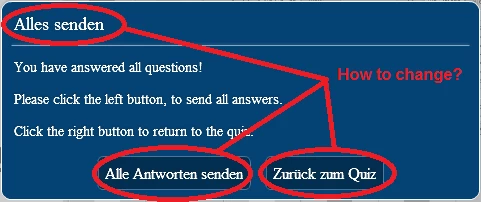
Cannot change language of "Send all Answers" at end of quiz

  • December 23, 2016
  • 1 reply
  • 200 views

Dear all captivate users,

I have some issues there in changing the language from german to english of automated answer window at the end of a quiz.

I can only change the content of the window, but not the frame (header and footer buttons).

I tried a new Installation of captivate (selected english instead of german in Installation progress) but this only helps when I start a completely new Project.

The only solution (but very unsatisfying) is to point this out within the window, in which text could be changed very easily.

Hope there are some other ppl with same issue out there or Adobe fix this...

best wishes!
    This topic has been closed for replies.

    1 reply

    Paul Wilson CTDP
    Community Expert
    Community Expert
    December 23, 2016

    My solution is to not use any feature in Adobe Captivate that requires the runtime dialog. As a Canadian this is an issue for me because of the fact that in Canada we have two official and legally required languages, English and French.


    There is a solution but my understanding is that it will only work on newly created projects. It isn't for the faint of heart (this is why I don't use it).

    1. Go to: C:\Program Files\Adobe\Adobe Captivate 9 x64\en_US (or equivalent on your system)
    2. Copy and create a backup of strings.txt and strings.zdct
    3. Open strings.txt copy
    4. Find text you want to change. Save the file.
    5. Make copy of it and rename it to strings.zdct 
    6. Copy both files back into the original folder
    Paul Wilson, CTDP