
Hassan_Adobe
Participant
September 8, 2015
Question

Cannot Change Slide Duration Default Time

  • September 8, 2015
  • 1 reply
  • 1350 views

Hi,

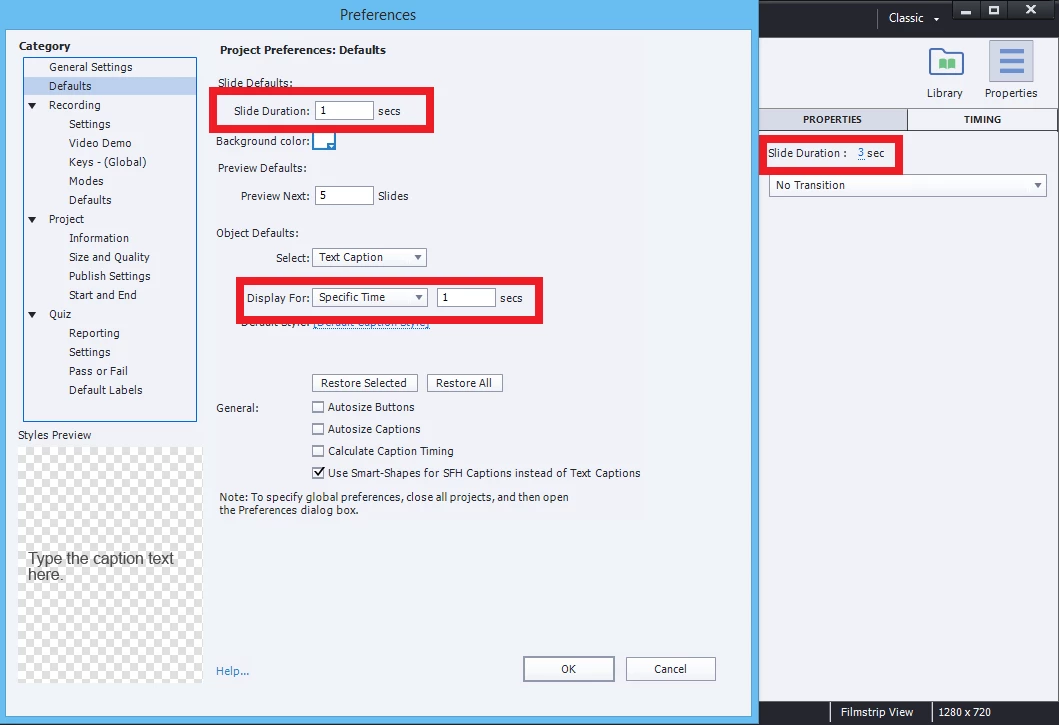
In order to change the default slide duration time I went to File>Project Info...>Defaults and then I changed both the 'Slide Duration' and 'Object Defaults' to 1 sec(s). However, the default duration remains as 3 seconds. On each slide, in the right panel, under Timing it still says slide duration is 3 secs. Does anyone know what I can do to properly change the default slide duration time?
    This topic has been closed for replies.

    1 reply

    Lilybiri
    Legend
    September 8, 2015

    New settings will only apply to new inserted slides, not to existing slides. If you want to change duration of existing slides, select them in the Filmstrip and use the Timing panel.

    Moreover 1 sec is really very short, is there any reason why you want all slides to be that short? If you ever have audio/video to load, or advanced/shared actions to be executed, I would not recommend to make slides that short.

    Hassan_Adobe
    Participant
    September 9, 2015

    But I import them from Microsoft PowerPoint. Is there a way to set the default duration whilst importing?

    The reason why I want the duration so short is because when I record an audio for the slide it automatically suggests the appropriate time which it wouldn't do if the duration is longer than the recording time.

    Lilybiri
    Legend
    September 9, 2015

    No, because each PPT slide will be converted to a movie slide (I never use PPT as base for eLearning myself). Its duration will depend on the PPT-slides. You have no control over it.

    Tip: start in Captivate from scratch, using the PPT-assets, editing and managing will be so much easier. If you want a converter from PPT to SWF or HTML, use a plug-in, that is not the main goal of Captivate at all.