


Known Participant
April 15, 2021
Question

Cannot get auto-complete turned off for TEB

  • April 15, 2021
  • 1 reply
  • 218 views

I have text entry box (Text_Entry_Box_29) on slide 2 of .cptx file attached.

In Chrome, the 2nd time I run this (and all subsequent tries) an auto-complete box pops up with input options.

I don't want this to apear.  

I have added javascript to slide (as instructed) to turn off the the auto-complete:

$("#Text_Entry_Box_29_inputField").attr("autocomplete","off");

But this does not seem to fix?  Other ideas?
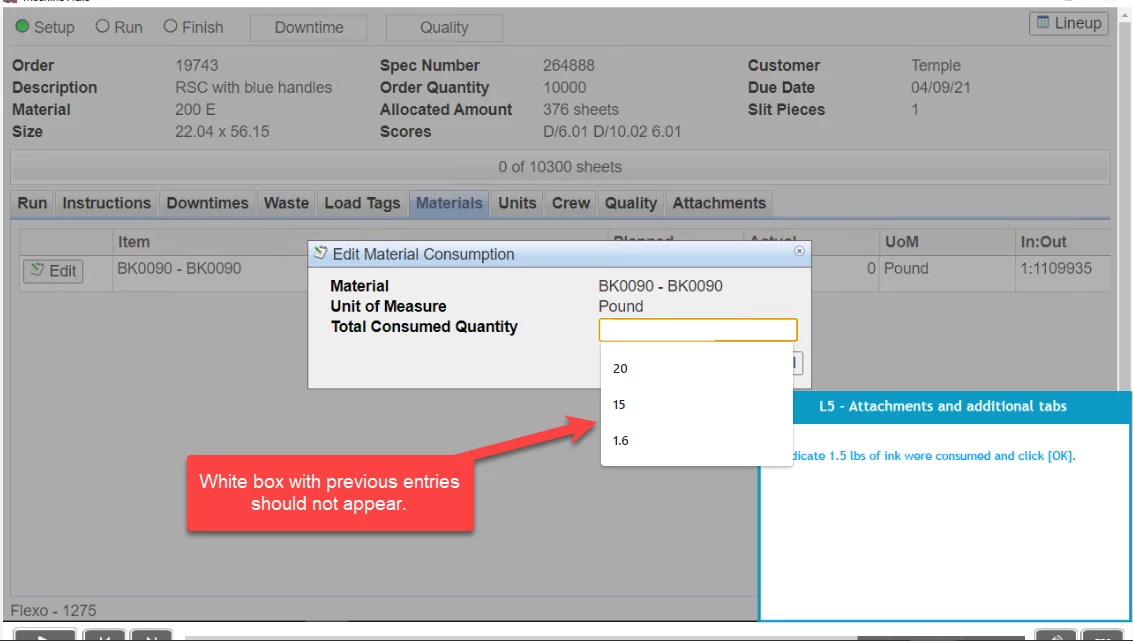
    This topic has been closed for replies.

    1 reply

    Known Participant
    April 15, 2021

    Unfortunately, small .cptx file won't attach (13MB).... gets removed.

    RodWard
    Community Expert
    Community Expert
    April 16, 2021

    This forum does not allow you to attach CPTX files.  


    You added the JS, but perhaps you did not add it correctly.   Try adding an alert box in the JS so that you can be sure the JS is actually working.


    And for some kinds of JS you need to test from a web server environment for it to work.  Did you test this using Preview HTML5 in Browser?