Participant
December 31, 2013
Answered

Cannot record software simulations

  • December 31, 2013
  • 3 replies
  • 721 views

I'm on a Mac using Mavericks.  I get an error message when I try to select the program to record.  Enable assistive devices
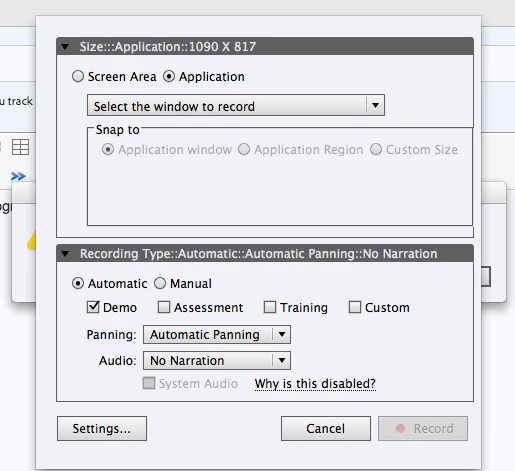
But there is no Enable Access for Assistive Devices, in System preferences > accessibility.  Any ideas?

    This topic has been closed for replies.
    Correct answer Himanshusingh10

    Try this: Go to System Preferences>Security & Privacy>Accessibility> Select Adobe Captivate.

    3 replies

    Himanshusingh10
    Himanshusingh10Correct answer
    Participating Frequently
    January 2, 2014

    Try this: Go to System Preferences>Security & Privacy>Accessibility> Select Adobe Captivate.

    Participant
    January 14, 2014

    Himanshu is correct - that will make Captivate work on Mavericks.

    It's hard to believe that the "patch" from Adobe to make Captivate work on Mavericks has instructions to make it work and the instructions are incorrect.  "Enable Access for Assistive Devices" does not even exist on Mavericks.  Does anyone even test this stuff before it's released?

    So Adobe continues with sloppy engineering and lack of QC.  Sad really.

    Lilybiri
    Legend
    December 31, 2013

    I don't know if the situation is the same on Mac, but for software captures on PC you need to run the application as an Administrator. The option 'Enable Accessibility' is normally selected by default and has to be turned off in case you want to have right-click functionality.

    December 31, 2013

    Try: Adobe Captivate > Preferences > Project > Publish Settings > Enable Accessibility.