Known Participant
July 29, 2015
Question

Cannot stop user from advancing quiz with incorrect answer

  • July 29, 2015
  • 1 reply
  • 846 views

I have tried a combination of different settings - when the user answers incorrectly on the first question, they are able to try again and answer until they get it correct. It then auto advances to the second question and if the user selects the incorrect answer, it does not let them answer again, it auto advances to the next slide.

I removed every slide except 4 quiz slides and the review slide. I removed the first quiz slide thinking it may have been something in that slide, but it reacts the exact same way.

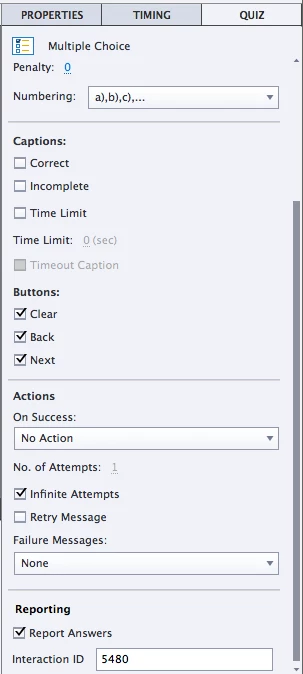
I have tried all 4 options under quiz settings - Required 

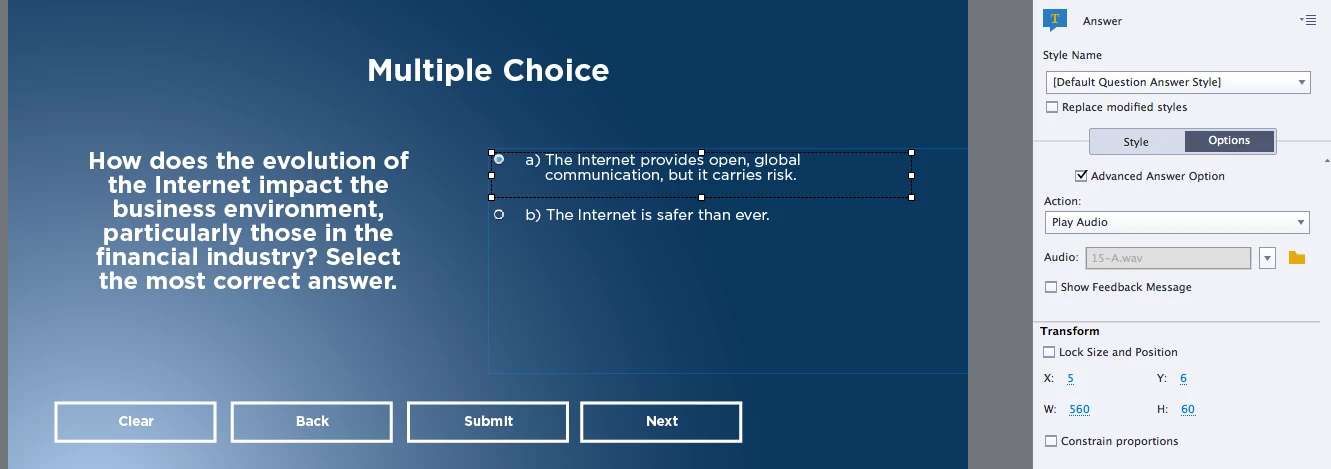
I have infinite attempts checked on each slide I am using advanced answer options for all of the answers.

Each has its own audio that tells you if the answer you chose was correct or incorrect with no visual feedback.

I am using Captivate 8. Not sure what else I can try at this point. Any ideas would be great.
This topic has been closed for replies.

1 reply

Lilybiri
Legend
July 29, 2015

I don't understand what you tried to explain, must be me.

I would first recommend to drag the Next button under the Clear button, because the user can always click that button to advance to the next question and skip this question.

You have infinite attempts, if you hide that Next button, normally the user will not be able to advance unless he has answered this question correctly.

Moreover you checked Advanced Answer, but you don't show a specific feedback message for each answer. Why did you choose Advanced Answer? Has each answer a specific audio playing instead? I have never used that possibility, but wondering now if the simple action 'Play Audio' is not releasing the play head? Can you check by inserting the system variable cpInfoCurrentFrame on the question slide, and watch if it starts changing when you click the second answer? The design of a question slide is that you have a pause at 1.5 secs. When a user submits an answer, a two-step process starts: first the feedback caption or shape appears that tells to press Y or to click on the slide. If the answer is correct, that press/click will start the actions specified for Success (for a correct answer) or After last attempt if attempts are limited. You don't have the last action because you have Infinite attempts. I would certainly activate the Retry message at least for testing purposes. Either the problem is what I suggested before, or you have messed up the normal design of the question slide.  If it is indeed the simple action that is causing problems, you could replace it by a shared action with one line Play Audio.

Can you check the behavior of that system variable?

kuraziAuthor
Known Participant
July 29, 2015

I normally have the Next, Clear and Back button hidden, but just so happened to add them back for testing purposes when I took the screen shot.

What I am having trouble with simply is that when I answer incorrectly in my quiz, it does not allow me to try again and answer correctly. When I click the incorrect answer, it plays the audio feedback and then automatically advances to the next slide.

I have audio feedback on the correct and incorrect answer - no visual feedback which is why it does not show specific feedback message for each answer. It plays an audio clip instead.

Im not sure how I go about inserting a system variable onto a quiz slide. I will see if i can figure that out,

Lilybiri
Legend
July 29, 2015

Create a text caption or shape. Go in edit mode by using F2 or double-clicking. Look at the Properties panel, Part Character and you'll see three buttons: the center button X is the one you can use to insert a variable. It will appear between $$ but when you preview the project you'll see the value, which is the frame number. It should not move on the question slide, once you reached the pausing point. So wait a little bit until that frame counter is stabilized. What happens when you choose a second answer?

And please, check the Retry message for testing at least.

You can learn about variables in this old post:

Curious about Variables in Captivate? - Captivate blog

And the most recent table with system variables can be found here: System variables in Captivate 8 - Captivate blog