
Captivate-Noob
Known Participant
July 16, 2015
Answered

Cant save object-Style and cant open Object-Style Manager ERROR

  • July 16, 2015
  • 12 replies
  • 1699 views

Hy there,

I am confused. When trying to save a Style I can click on OK and nothing happens.

When trying to open the Style-Manager Captivate 8 is colapsing with a fatal error. (Captivate 8.01.242)

When I open Example-Projects I dont have this problem. It just happens when creating new projects.

What can I do?

greetings

Joachim
    This topic has been closed for replies.
    Correct answer Lilybiri

    What do you see in Themes? I see in German that button has the label 'Designs'? I'm just trying, totally stumped by your problem.

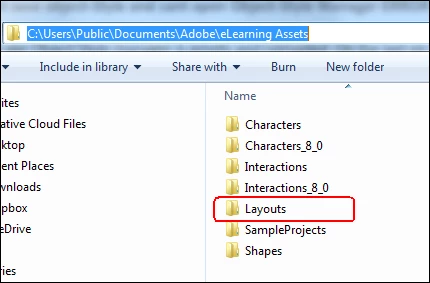
    The Layouts folder I was talking about seems to be corrupted. That is why I asked if you deleted it before reinstalling. The path is:

    12 replies

    Captivate-Noob
    Known Participant
    July 16, 2015

    I cleared the Cache and I used the Utils "Clear" function for Windows as well.

    I just open an empty Project, insert a form and try to save the Style. Not possible. The Stylename is set to "custom" and I cant create a new style.

    The Object-Style Manager is not working as well.

    I reinstalled the hole program. Then I took the update to 8.1.

    Another Problem: I get the Firewall Bug everytime I start. I now set the startbutton to "run as administrator" for all users everytime. No Change...

    It doesnt work.

    Lilybiri
    Legend
    July 16, 2015

    I have problems with your terminology (am not a native English speaker): what do you mean by 'insert a form'? How do you try to save a Style, which work flow are you using?

    Is Captivate installed on your system and are the documents and cache folders both on your system as well, not no networked drives?

    Ignore that firewall warning, just give CP access.

    Lilybiri
    Legend
    July 16, 2015

    Try clearing cache. If problem is not solved use the Clean file in the

    subfolder Utils under the installation folder of CP. Do you run it as

    Administrator?

    Gray Susan
    Inspiring
    July 16, 2015

    What exactly does the Clean file do?  I'm wondering if it would corrupt other working projects if you used it because a different project wasn't acting correctly.

    Lilybiri
    Legend
    July 16, 2015

    Cleaning Preferences. They have all the customisation and for some weird reason tend to get corrupted quite often. When you use the clean operation a default Preferences folder is created, that is guaranteed without corruption but you lose all customisation. I blogged about ways to restore some of them:

    Captivate 8.0.1 Install? Keep your Customisation! - Captivate blog