
Inspiring
January 31, 2017
Answered

Cap 9; Drop and Drag; After clicking submit, the slide continues to play

  • January 31, 2017
  • 2 replies
  • 282 views

Hi All.  Unable to find what I am looking for.  I am using Captivate 9.  I have a drag and drop slide.  I also have 18 seconds of instruction on that slide as to how to complete the drag and drop.  After I complete the D&D activity, the slide plays many seconds (around 18 secs?) with no audio before it continues to the next slide.  I cannot figure out why this is happening.  I have a suspicion but not a resolution.

This is a rush as I present to program managers on Thursday.  Thanks so much for your assistance.

Gretchen
    This topic has been closed for replies.
    Correct answer Lilybiri

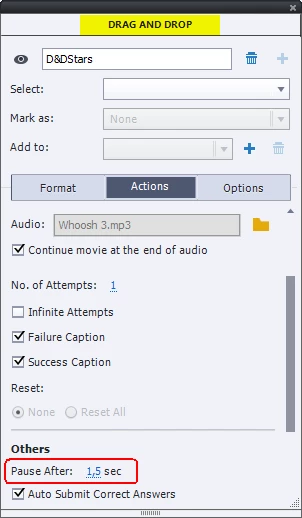
    Did you read my answer? You have to change the pausing point of the D&D slide, increase it till almost the end of the slide:

    2 replies

    Lilybiri
    Legend
    January 31, 2017

    I'm just finishing a 4th article about Timelines, and this one has its focus on the pausing of timelines. You are bumping onto a pausing point that is automatically inserted in any D&D slide but doesn't show up in the timeline.  If you talk about slide audio, you'll have to move the pausing point in the D&D slide. You cannot do it by dragging, nor in the Timeline Properties, but have to go to the Actions tab in the D&D panel. You 'll see that the default time is 1,5secs.

    I will try to post a link to the article when it is published. Another way would be to replace slide audio by the Play Audio command, and use the D&D actions to execute the command 'Stop Triggered audio'.

    RodWard
    Community Expert
    Community Expert
    January 31, 2017

    Where did you insert the audio voiceover on that slide?  Is it inserted at the slide level or object level or is it set to play by some Play Audio action?

    gvlaAuthor
    Inspiring
    January 31, 2017

    The audio is slide based.

    Lilybiri
    LilybiriCorrect answer
    Legend
    January 31, 2017

    Did you read my answer? You have to change the pausing point of the D&D slide, increase it till almost the end of the slide: