Inspiring
October 4, 2016
Question

Cap 9 - Navigation Buttons - Active/Inactive

  • October 4, 2016
  • 1 reply
  • 359 views

I thought I was a fairly advanced Cap8 user....got the Cap9 version and now struggling with making navigation buttons work. I know this because I went back to Cap8 to recreate the issue and did not have a problem. Another issue is that I took over a project from another developer who had created some master slides...

I have searched the forum for similar problems and read Lilybiri responses here and her blog post on the timeline...still no resolution to the problem.

Problem -  Where I have changed the navigation action from that of the previous developer or created a new navigation which is not "next" or "previous" this navigation action does not work. The problem appears mainly with the "Jump to slide" action which functions on some buttons but not others (see image).

Does my problem have anything to do with "states" which I am using for the first time with Cap9?

Thank you
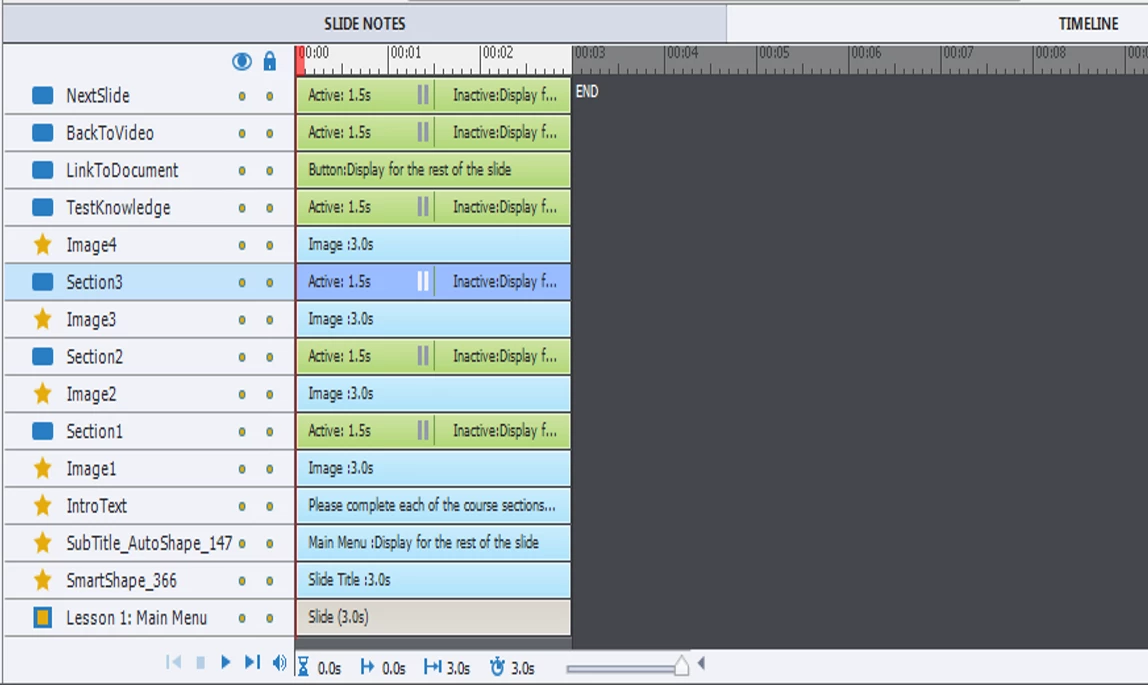
Message was edited by: Darral Brown - Missing screen grab added.

    This topic has been closed for replies.

    1 reply

    Lilybiri
    Legend
    October 4, 2016

    States were already available in Captivate 8, although the work flow to edit InBuilt states has changed. The buttons you are tlaking about look like Transparent buttons, not shape buttons, is that correct? I doubt very much that your problem is due to states, but could be wrong of course.

    All buttons have pausing time at the same moment, which is fine. Is the 'Jump to Slide' a simple action applied to the button or an advanced action? What has changed in CP9 is the possibility to uncheck the option 'Continue Playing Project' for simple actions, which was not possible in CP8.

    deeb2400Author
    Inspiring
    October 4, 2016

    I have tried both transparent and shape buttons with the same non-functioning result. The image shows the shape buttons.

    The Jump to slide action is applied to the button.

    Lilybiri
    Legend
    October 4, 2016

    What about 'Continue Playing the Project)? Can you post a screenshot of the timeline of that menu slide and of the Actions tab of one of those 'Jump to' buttons?

    Another questions: how did you test? Do you have a quiz in this project? If yes, what is the Required setting?