
ffami
Known Participant
Jun 13, 2019 9:05 AM UTC
Question

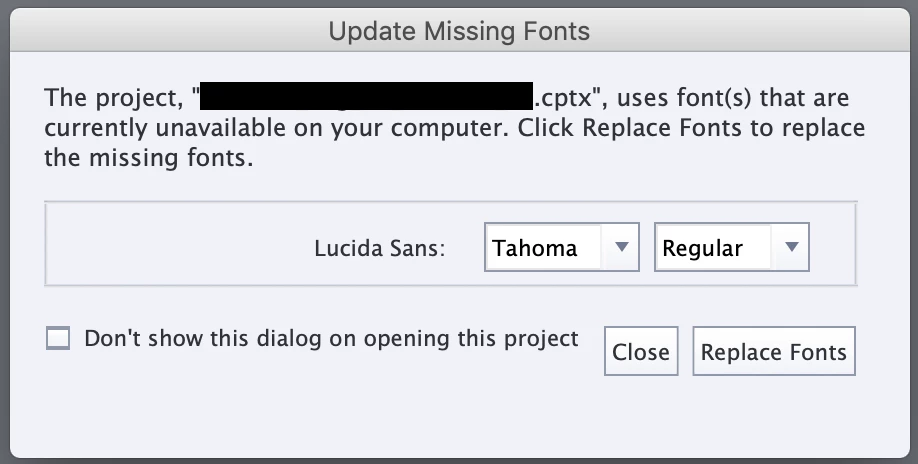
Captivate 11.5.0.476 replaces missing fonts (which are not missing) with Tahoma

Hey!

Since the latest update, Captivate is akting me to replace "missing fonts" after opening a project.

The fonts aren't missing, I can see them working fine on the first slide.

It always misses Lucida Sans, which I don't use in my projects.

No matter which font I choose of even if I cancel, every font in my projects will be replaced by Tahoma.

I've tried opening projects with customers corporate fonts and projects which only use Arial, all of them get this message. Unit Pro for example.

The only option I have right now, is to let Captivate replace all of my fonts and put them back to what I used before manually.

After that it won't ask me to replace, but that can't be the way to go? This takes forever

I'm on macOS Mojave 10.14.4.
This topic is closed to new replies. Start a new post to keep the conversation going.

111 replies

Diarm87
Inspiring
Feb 25, 2021 1:24 PM UTC

Has there been any updates on this??

I read through the problems here and I'm expriencing the exact same issues

- I've been working on a project with the Georgia (websafe) font.

- Opened the file this morning and it's telling me that it wants to change "Liberteen Bold" to "Tahoma Regular".(neither of which I am using)

- No matter what I do, it replaces the whole project with Tahoma Font...


Translate
Diarm87
Inspiring
Feb 25, 2021 1:27 PM UTC

Nevermind, I just figured it out!

Translate
Known Participant
May 26, 2021 8:21 PM UTC

Please share what you did to figure it out.  Are you now no longer experiencing the font replacement issues?


Translate
vt0123456789
Participant
Dec 22, 2020 7:10 PM UTC

Hi - I'm curious if there has been any updates to this issue? I've read through the entire thread and followed the advice given (about making sure all the fonts are installed, uninstalling them, logging out/in, etc.) and I'm still experiencing this issue. I have dozens of files to update and this is going to cause me a great deal of time and frustration. I am hoping someone has figured out a solid workaround. Thank you!

Translate
markw57746223
Participating Frequently
Dec 23, 2020 7:40 PM UTC

Same here and I can confirm it is happening on Mac and PC. 


Mark -

Translate
Mark_W
Claire_a_bradshaw
Known Participant
Mar 9, 2020 3:20 PM UTC

Hi there - this has now been recognised as an official Bug. After many months of communication with Adobe, testing, video screen capture and tests with fonts, it has been found you need to have the Regular font face of your Font Family installed to prevent the font missing alert to occur. Without the Regular font face, your fonts will be replaced. 

Occurs in Captivate 2019 Version 2+. Not in Version 1. 

Adobe have stated this is now a Bug to repair in a future release. This has also been confirmed by Pooja Jaisingh too after talking to her face to face about the issue and her own investigation. Hopefully this will be resolved soon.  

Translate
Participant
Mar 10, 2020 3:33 PM UTC

I am glad Adobe has finally recognized it is a flaw in the program. Still, though I'm not positive about simply needing the regular font face. I pretty much work only with regular font faces but have seen this problem too many times to count. Plus I turn the whole font family off/on when I struggle with this, but do not get instant relief.


I have found that sometimes the Adobe CC application has quit or didn't launch before I started Captivate. I believe this causes the replace font problem every time. Quitting captivate and making sure Adobe CC is running first, will sometimes correct the error. However, other times the Adobe CC application is running and the error remains. Usually restarting the computer, waiting for Adobe CC to launch, disabling/reenabling font face, and then reopening the Captivate project will fix things. However, I often spend 30 minutes or more fiddling just to open a project without replacing fonts. 


So far as system fonts vs. Adobe fonts... isn't the official word that you should only use Adobe fonts (web-based) for HTML5 projects? Maybe I misread, but system fonts rely on the audience computers having the fonts installed. Don't they? I understood the whole integration of Adobe Fonts (web-based) to be part of Captivate's transition to HTML5.


Oh and yes, I have seen the blog posts on using custom web fonts and then editing the published SCORM file's HTML/CSS directly, however, I am referring to working directly within Captivate. Also, while we are on the topic, why are there two buttons in that Replace Font dialog, which seem to do the same thing?


Mark -

Translate
Inspiring
Aug 19, 2019 1:24 PM UTC

Well...

Find fonts says I'm not logged in to Creative cloud. LOCKED

I think there is a connection to this.

Translate
Claire_a_bradshaw
Known Participant
Aug 19, 2019 1:33 PM UTC

Solution.

I licensed Brown Pro Regular for two weeks for a test and installed it.

Captivate Font Replacement says "Myriad Pro is missing - replace with Tahoma?" - click Close

Font replacement in progress.

Brown Pro left alone - all versions and uses intact - bold, light etc.

So for bespoke fonts - our solution is install the regular font. Now to buy the Enterprise Level license agreement for that font face... ££££$$$$

This brings two things to light –

  1. Adobe has released a patch that although adds new functionality for checking if a font is available, the Regular Font Face as a minimum must be installed for a font to be recognized. Some individuals/companies may NOT have that font available and will have to purchase a license for it which could amount to a lot of money
  2. Details of A was not made apparent during the release train of Version 2 or 3. <-- anything that requires additional 3rd party purchases shouldn't be hidden in release notes.

This means Adobe failed to keep customers aware of changes to the software that would affect their projects and license for fonts. There should not be a necessity to have all of the face or Regular installed if a user is using a subset of that Font and that subset IS available on the computer.

I believe that Adobe should make customers aware that Version 2 and above has this requirement for a custom font to work. We blindly installed the update then had a whole world of problems. But I don’t believe Adobe will do this.

best regards

Translate
Participating Frequently
Aug 16, 2019 2:51 PM UTC

Ok, I've been dealing with this nonsensical problem for way to long and I may have figured out a way around it. (I have also logged a bug report with Adobe).

This solution worked for me - your mileage may vary.

Any 'custom' fonts that you wish to use in your Captivate projects need to be installed through Captivate!

As I use more than one Adobe tool I installed our corporate brand fonts through the CC application. For whatever reason, Cp would not recognize that the fonts were installed.

In desperation:

I went into CC and deactivated the 'missing' fonts.

Rebooted computer.

Opened Cp to the project with the problem,

Clicked close on the font replacer (which then promptly changed everything to Tahoma),

Select a text box that now uses Tahoma,

Click on the CC icon beside the font dropdown in Cp,

Find fonts, activate the entire family <- you MUST activate the entire family!

Font now available to select in fonts list,

Close Cp without saving the now screwed up project,

Reopen Cp to the project - NO MORE FONT REPLACER and all fonts display as they were intended to.

If you are experiencing this problem - even if this fixes it - please log a bug report.

PS. Adobe reps - I figured this out AFTER speaking to you. Please test and if it works pass the word.

Translate
Claire_a_bradshaw
Known Participant
Aug 16, 2019 2:57 PM UTC

Sounds good - I will have a try.

I was asked by Adobe if I had the Regular face of the custom font we use. As we have not licensed that, I have had to arrange a special 2 week developer license, through our Legal team and Senior management with the font owners to obtain such a licensed font!!

This is borderline ridiculous.

I don't understand why the Multi-billion dollar corp that is Adobe can't be doing this testing for us....

Oh yes, it's because it's a feature.... 

Translate
Participating Frequently
Aug 1, 2019 7:04 PM UTC

we only have font issues on Captivate 2019 v2 latest release.

i am monitoring this thread because it is happening to all 5 of our developers. we are using only 2 fonts the was purchased by the company. Avenir and Camphor. We have been using only 2 fonts since 2013. We simply install the fonts on our control panel by adding them to the fonts folder in windows. Always publishing in HTML5 mobile and PC. have gone from Captivate 7, 8, 9 and 2019 version 1 with no font issues. the same captivate files are updated every few months, have gone through different versions of captivate with no problems. same themes and master slides.

Except for the latest release, we open the cptx, gets prompted to change the file, saying we have Myriad Pro. It doesnt say we are missing OUR fonts. it says missing Myriad Pro. After the pop up, all our text are TAHOMA. We cant waste time changing all text boxes to our font. there is no Replace Fonts option on captivate.

Our team is skipping this update until we find a fix. If anyone wants our CPTX and fonts, i'll be happy to share them if you want to recreate the issue. Hope this gets resolved soon.

Thanks,

Translate
Lilybiri
Legend
Aug 1, 2019 7:25 PM UTC

This sentence is no longer correct 'there is no Replace Fonts option on captivate.'

You can replace the fonts in all object styles using fonts, with the Theme Properties button, Edit.  Provided you have a proper theme, no overridden styles. This is a brand new feature. Of course in this forum most reactions are negative, rarely positive.

See: Themes are Time savers. What is NEW in 11.5? - Captivate blog

Myriad Pro used to be the default font many versions ago, when Adobe did package that font for free with most applications, including Captivate. That is no longer the case since... (cannot remember, at least 3 versions).

Translate
Participating Frequently
Aug 1, 2019 8:15 PM UTC

Wow! Theme properties change font worked! i simply replaced Tahoma  with our font using theme properties.

Thank you very much!

Its just weird that this new version says we're missing Myriad pro, changes our fonts to Tahoma, but then can bring them back using theme properties.

I guess that's way this is not a bug? We are simply using outdated themes and not knowing Adobe added a change font feature. (we rarely visit this forum and look at new features because everything is going well for us for the past few years)

Honestly, I really like Captivate 9 and the first 2019 release. Management have been pushing for Storyline, but i've always rallied for Captivate. Luckily it was my decision to test new version before pushing to the team. I think we only get negative reactions on the forum because if everything is going well, people rarely visit the forums. i really like the new features and the only time i visit the forum is when something is wrong (rarely) for our team.

I'll cascade the theme font change to our team and push the V2 updates to everyone, then we'll probably have no issues in the future unless this functionality changes again.

Again, Thank you very much, Lilybiri! i am big fan! you dont know how many times you have help me and other with your activity here on the community!

Translate
cpbrandon
Inspiring
Aug 1, 2019 5:09 PM UTC

Hi - thought  I'd suggest something I read about adding custom fonts to projects. Not sure whether those having the problem are publishing the HTML5, but this guy seems to have some fairly straightforward instructions which as he states in first paragraph include details that weren't in other blogs: https://medium.com/@sepyle/use-any-font-in-adobe-captivate-when-publishing-in-html5-8b03d2cabd7. I have tried (and failed) in the past to do this, but never created a Fonts folder to which I added the custom fonts, and then placed that folder in the css folder as he suggests. May be worth a shot if you were expecting to pull the font from the normal folder where fonts are installed on your device. Again, I'm not sure if this will help anyone, just throwing something out there in case you haven't tried it.

Claire_a_bradshaw - how many Brown Pro font faces are you using? From a quick search I found site that has 19 total in that font family. I know you know this from reading above, but you are supposed to have the whole font family installed.

Another quick thought, although would still require you to probably go in and verify your fonts in the end, but for those who are having ALL fonts replaced by Tahoma no matter what, can you go to the Themes button > ensure you have your correct theme selected (which may or may not have the fonts in question) > click Theme Properties > then click Edit. From this dialog, can you successfully replace the Tahoma fonts? I know that isn't going to solve the issue, but might help with updating them.

Apologies if none of that helps, or is a repeat of something already mentioned. Something also I find a little strange about this whole thing is that Tahoma is the chosen fallback font. It's not listed as a Web Safe Font in Captivate, so I wonder what then would actually be displayed to users who don't have Tahoma on their system. Good luck - hope you all find a solution soon.

Translate
Participant
Jul 19, 2019 12:46 AM UTC

Hopefully I'm not repeating another answer. I did scroll down and I don't think that it was addressed.

Anyway, my response is a question: Does this happen when you first open the software after booting your machine, or is it a persistent thing? 

Reason: When I boot my machine (Win 10) and open up Captivate, it inevitably brings up the font replacement window. I have to sign out, wait for a little while, and then open up Captivate. If I don't immediately open up Captivate, I don't get this issue.

I suspect that it's on the Creative Cloud side of things and how it handles font synchronisation.

If, on the other hand, this happens all the time then it is not something that I have experienced and apologies for wasting any of your time.

Translate
Claire_a_bradshaw
Known Participant
Jul 19, 2019 8:24 AM UTC

Hey - ok I followed your process - I signed out of Captivate and signed back in - same thing. Then I signed out again and waited a few minutes before signing in again. Then an alert came up in the task bar stating 2 fonts (maybe more) had been activated. Maybe on to something here.

Opened an old file - same issue. Also I cannot find our company font on Adobes website font finder. Is that another issue? If it is not here then it causes a problem in Captivate? So may be a sync problem is at fault?

Our demo file made in 2019 V1 has been sent to Adobe for analysis.

Translate
CDubber
Known Participant
Jul 17, 2019 8:28 PM UTC

How has this bug not been fixed yet???

Translate
Claire_a_bradshaw
Known Participant
Jul 18, 2019 7:39 AM UTC

Hi all - in a direct conversation with Adobe technical support by phone, I was repeatedly told that it was a feature. That Myriad Pro must be in the file some where and as I don't have Myriad Pro on my machine, it is replacing that font.

I pointed out -

a) We don't use Myriad Pro anywhere in our template file as we use Brown Pro as our company font - it is a requirement, not a suggestion

b) Even if there was one use of Myriad Pro accidentally in the template, why does the operation replace ALL uses of ANY font in the file with Tahoma, that is an OBVIOUS bug

c) There is no method of Cancelling this "feature" - clicking either option in the Pop up does the same thing.

I explained these in several ways until finally the help desk engineer asked for a non-Version 2 file to be sent to them using our font for internal testing. I'm organizing this now - so watch this space.

Translate
ShivaniParihar
Adobe Employee
Adobe Employee
Jul 18, 2019 10:31 AM UTC

Hey,

In my previous comment, what i wanted to explain was, how and why that replace was happening. Any replace is triggered, only when a font used was/is missing (originally or on change). Even in the video i shared, the reason Times New Roman was replaced with Tahoma in the update 2 was because originally it used Coniferous and and in the update 2 Missing font dialog, i chose to replace "Coniferous" with Tahoma. This is how it should work, according to me.

Please let me know, if you think otherwise.

Regards,

Shivani

Translate
marcusmatthews
Known Participant
Jun 23, 2019 3:08 PM UTC

I am adding that I too had no font issues with the 11.0.5 version and now with 11.5 get the Missing Font window message on most exiting and new projects, for fonts which are NOT missing! Sometimes I have allowed a replacement, and then find that my projects which use Arial have these replaced with Tahoma (both fonts were already on the system!). I haven't got the time and energy at the moment to do a fuller test ...!

Translate