


srb3454480
Participant
December 29, 2023
Answered

Captivate 11.5.5 2019 PC Publish Gets Stuck at Optimizing Content

  • December 29, 2023
  • 2 replies
  • 1485 views

I have had multiple projects in Adobe Captivate 2019 that fail to publish to my computer "all of the way," instead getting stuck at "Optimizing Content." Then, I cancel the publish and it appears all of the assets are there except for the index.html or scormindex. (I've tried to publish as both Html5 and SCORM separately).

I've removed all transitions and checked my HTML tracker. I also ran the "CleanPreferencesWin.bat" 

and tried to run the project and save as the administrator with no luck.

I then tried copying and pasting the first five slides into a new project and saving and publishing that way, no luck. Still gets stuck at Optimizing Content and the folders look like this (folder assets) below.


I'm out of ideas here. My next step would be to uninstall and reinstall I'm guessing. Any ideas why it gets stuck and why some assets are published and others are not?

 

This topic has been closed for replies.
Correct answer RodWard

The Optimizing Content message usually appears because you have a number of slides that are set to Optimized quality.  This means that when the project is published Captivate trawls through those slides and tries to change the compression settings on graphics to make them smaller and therefore faster to load.  


The irony of this (in your case) seems to be that something in your project is tripping up the optimization process and not allowing publishing to complete.


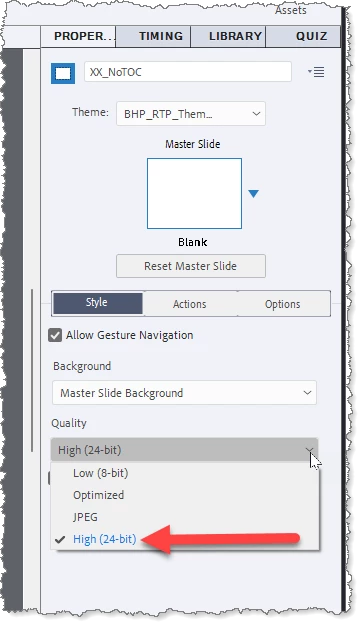
My suggestion is that you do a Save As to take a copy of your current project, then select all slides in the project and change the quality setting to High (24 bit) as shown in this screen capture.

This should mean that no optimization takes place at publishing and you should at least get further along in the publishing process, hopefully all the way to completion.


In my experience, the only times that the Optimized or JPEG settings are worth using is when you have a lot of images in your project that have gentle gradients or photos of people and nature etc.  If your project contains mostly flat graphics, then the 24 bit quality setting often results in a lower file size for the final published output.

2 replies

RodWard
Community Expert
RodWardCommunity ExpertCorrect answer
Community Expert
December 31, 2023

The Optimizing Content message usually appears because you have a number of slides that are set to Optimized quality.  This means that when the project is published Captivate trawls through those slides and tries to change the compression settings on graphics to make them smaller and therefore faster to load.  


The irony of this (in your case) seems to be that something in your project is tripping up the optimization process and not allowing publishing to complete.


My suggestion is that you do a Save As to take a copy of your current project, then select all slides in the project and change the quality setting to High (24 bit) as shown in this screen capture.

This should mean that no optimization takes place at publishing and you should at least get further along in the publishing process, hopefully all the way to completion.


In my experience, the only times that the Optimized or JPEG settings are worth using is when you have a lot of images in your project that have gentle gradients or photos of people and nature etc.  If your project contains mostly flat graphics, then the 24 bit quality setting often results in a lower file size for the final published output.

Participating Frequently
January 2, 2024

@RodWard This was it! It published with no issues. Thank you so much for sharing and advising. 👏

@Lilybiri  Thank you for trying to help. I learned more about themes. 

Lilybiri
Legend
December 29, 2023

You have already tried a lot of troubleshooting workflows. I am thinking about a possible corruption of the Theme you are usubg. is this a custom theme? Is the Theme saved with the default themes or elsewhere?

Participating Frequently
December 29, 2023

It's possible. I used a pre-made template from a vendor, so there are default styles to choose from, etc. I got tired of trying, so I uninstalled and am in the process of reinstalling. It's been an hour though....

Lilybiri
Legend
December 29, 2023

In that case I sincerely doubt that reinstalling will sole the problem if you use the same workflow.