
Captivate 11.5/MacOS 10.14.5 - Hypertext buttons disappeared
Hi Community
I'm still a newbie to Captivate, though I've managed two projects so far. Now in project number two I used a couple of times hyperlinks in text captions. So far so good. But now the buttons to either insert or modify and delete hyperlinks have disappeared. See the screenshot below:
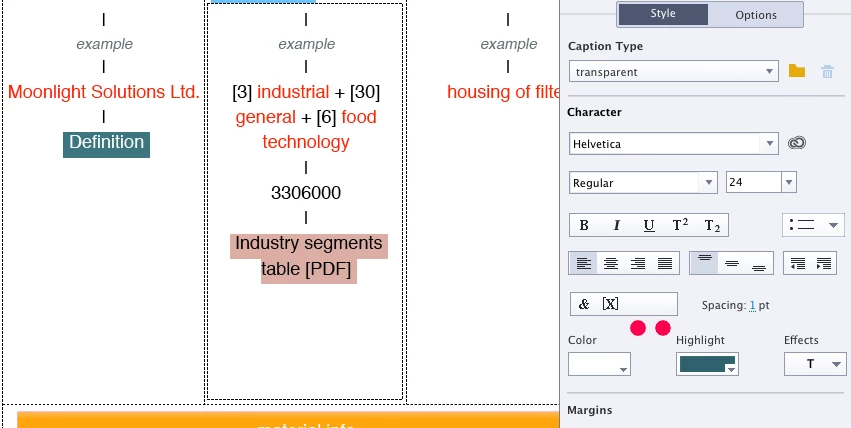
The hyperlink " Industry segments table " is selected in this case. Below the bar I added two red circles where normally the buttons should be: Modify hyperlink and delete hyperlink. In my project they where always present until I started yesterday to use a highlight color for those links. Now the buttons are gone. not sure if there's a connection.
I tried Lilibiri's advice from this thread: Re: Hyperlink button disappeared
- Clear the cache (Captivate Preferences)
- Clean preferences (with Applications/Adobe Captivate/utils/CleanPreferencesMac)
After the second measure Captivate started like a fresh installation with i.e. no files under Recent, but the Hyperlink buttons remain vanished.
I wonder when I did the clean preferences thing, the terminal show this:
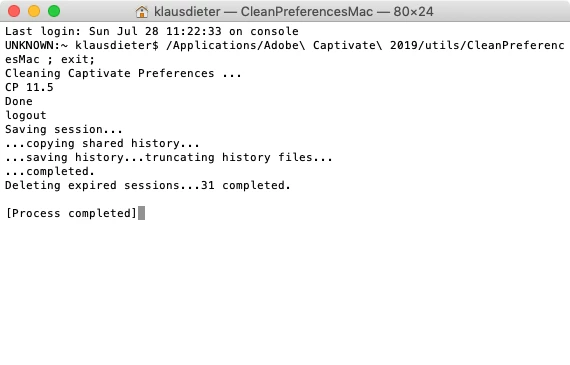
I got a little worried about line 2 starting with UNKNOWN: Was it just a coincidence that I was logged out of my CC account, which indeed and surprisingly I was, or is there a connection to my problem. There is a multitude of other weird things going on with Captivate. For example I have a 16 colours ASE palette which I append with the Swatch Manager to the standard swatches. Everytime I close and open Captivate and open my project file, those appended swatches are lost and I have do it all again and again and ... The same happens with gradients which I added to Custom Gradients in my project, they are gone after quitting and reopening CP and the project.
What's going on, who can help me?
Klaus


 AdChoices