Inspiring
March 4, 2024
解決済み

Captivate 12.2 audio begins to replay before going to the next slide

  • March 4, 2024
  • 返信数 1.
  • 1085 ビュー

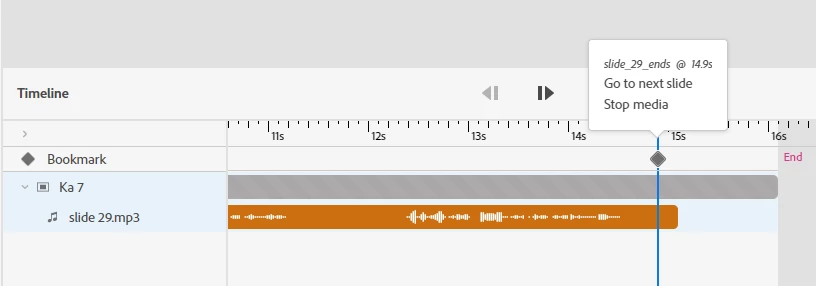
I've inserted .mp3 audio onto my slides, and each slide has a bookmark at the end of the timeline with an interaction to go to the next slide. 


So from the user's perspective, slide one plays, then immediately loads slide two, etc. No pausing. No intervention from the user.


But. The first 2-3 words of each slide begin to play again at the end before it changes to the next slide.


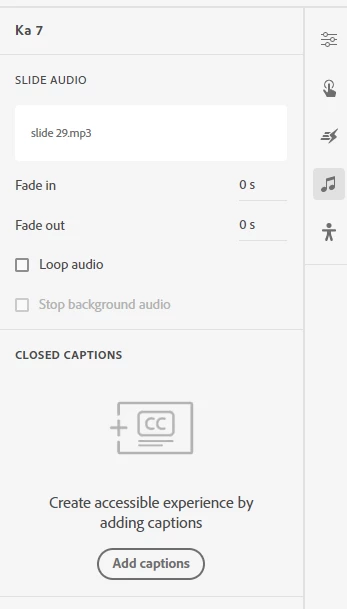
I've added an additional interaction to Stop Media, and I've extended the slide time out beyond the duration of the audio. The Loop checkbox for the audio is NOT selected. Still does it. 


Any thoughts on how I can fix this?


    このトピックへの返信は締め切られました。
    解決に役立った回答 Tichelle_Berg

    I actually considered that because I came upon one of your old posts when I was searching for a solution before I posted this. 


    And I just figured out what's causing it. It's definitely the transition to the next slide. I tested it on several - once I removed the slide transition from the interaction, the audio behaved properly.


    返信数 1

    Lilybiri
    Legend
    March 4, 2024

    Can be a new bug of course, but could you try the old workaround which I use since eons for older versions: leave a small gap before and after the audio timeline. Never cut the 'dirty silence' within the audio clip at its start and end completely as well. Here is a screenshot of the 'gaps' in version CP2019:

    Tichelle_Berg作成者解決!
    Inspiring
    March 4, 2024

    I actually considered that because I came upon one of your old posts when I was searching for a solution before I posted this. 


    And I just figured out what's causing it. It's definitely the transition to the next slide. I tested it on several - once I removed the slide transition from the interaction, the audio behaved properly.


    Tichelle_Berg作成者
    Inspiring
    March 4, 2024

    Should I report this as a bug??