
widgityvicky
Known Participant
June 20, 2017
Answered

Captivate 2017 and the review area

  • June 20, 2017
  • 1 reply
  • 832 views

Help!

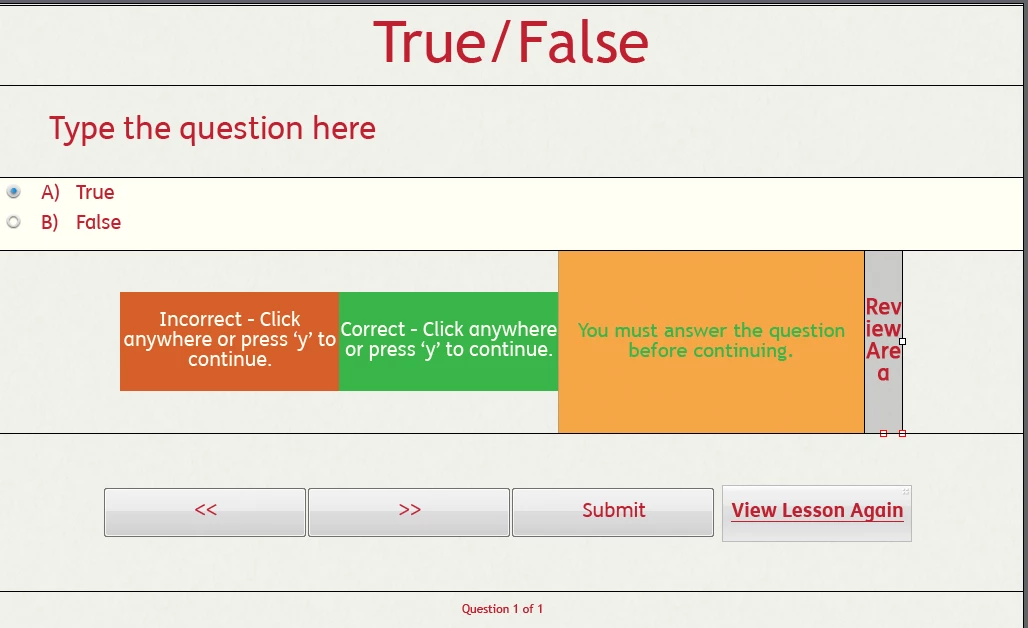
New to Captivate. Just starting to get to grips... but....... in quiz, I get a box that says Review area, next to the correct and incorrect texts... what the heck is it? I cant seem to remove it, it doesnt seem to do anything, and its in the way.....  can anyone help me?
    This topic has been closed for replies.
    Correct answer Lilybiri

    It is a responsive project? You didn't confirm that, I just suspected from the screenshot.

    For all those 'boxes' (in most themes those are shapes) the stack order doesn't matter at all, since only one of them will appear at the same time. The size depends on the static fluid box containing those messages.

    1 reply

    Lilybiri
    Legend
    June 20, 2017

    Review area is only used when the user skipped a question or answered it incompletely.

    Did you read this, because this looks like a responsive project with Fluid boxes:

    Tips for 'Fluid' Quiz Slides - Captivate blog

    widgityvicky
    Known Participant
    June 21, 2017

    So should the correct , incorrect etc be on top of the review area....? Does the size of those boxes matter? I'll have a deeper read of the link too......

    Lilybiri
    LilybiriCorrect answer
    Legend
    June 21, 2017

    It is a responsive project? You didn't confirm that, I just suspected from the screenshot.

    For all those 'boxes' (in most themes those are shapes) the stack order doesn't matter at all, since only one of them will appear at the same time. The size depends on the static fluid box containing those messages.