

Captivate 2017 Closed Captioning Issue
Hi All,
I converted a project from CAP 9 to Cap 2017 with CC and now the text position is above the bottom of the screen. I would like the text to be at the very bottom like it is in Captivate 9 as you can see in the third and last screenshot. The second screenshot shows the CC settings in Cap 10, I am unable to change the Y axis to over 95% even if I change the text size to smaller and cannot change the HT either. Any ideas? Also, are there any custom system variables to customize the position of the CC text anymore? I know if I create my own CC button that there is a toggle on/off system variable. Also, what if any third party software are you using for CC in Captivate?
Thank you,

Cap 2017 closed captioning when previewing project.
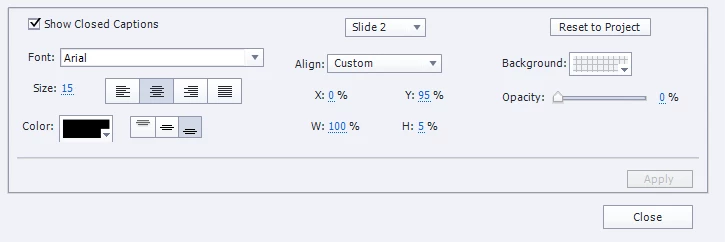
Cap 2017 closed captioning settings.

Cap 9 closed captioning when previewing project.
 AdChoices