
viji_jigajini
Known Participant
May 15, 2017
Question

Captivate 2017 - Default settings for Simulations

  • May 15, 2017
  • 2 replies
  • 1057 views

Hi,

I got Captivate 2017 this month.

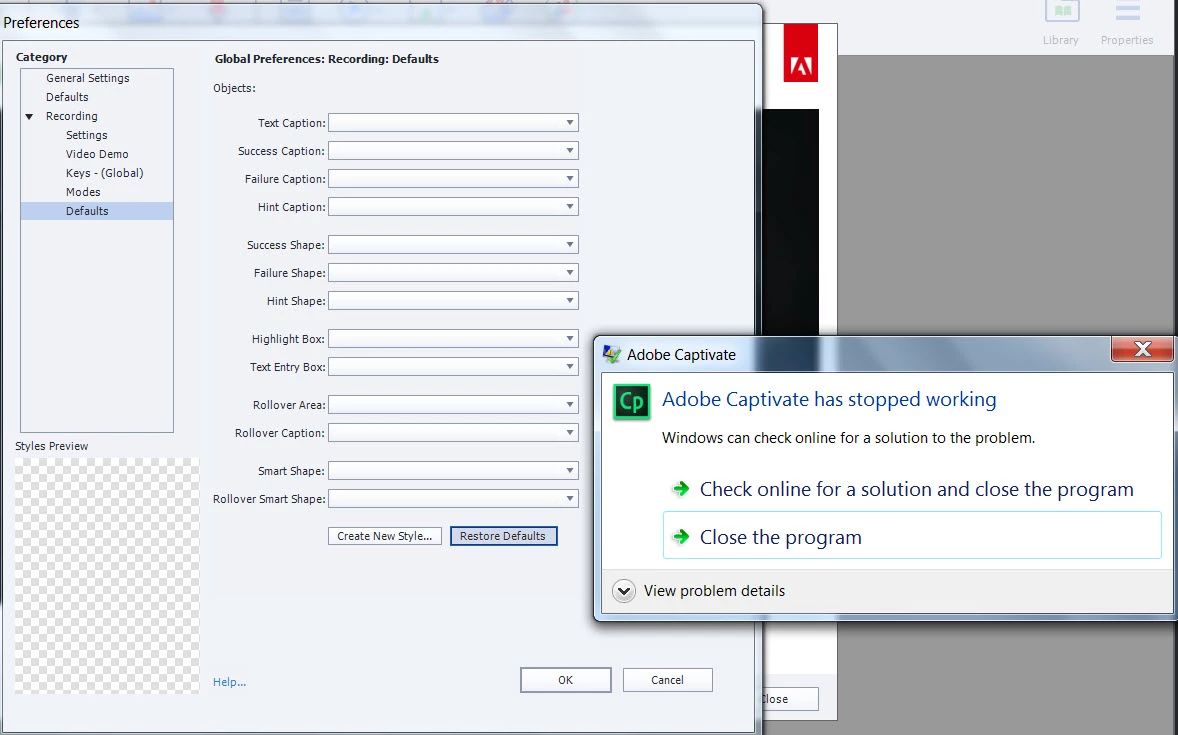
I am trying to capture a software simulation. Hence, I am trying to set some preferences. However, I am unable to see any default settings.

When I click the "Restore Defaults" button, Captivate displays the message "Adobe Captivate has Stopped Working".

Please help me fix this issue.
This topic has been closed for replies.

2 replies

HimanshuSatija
Adobe Employee
Adobe Employee
May 15, 2017

Hi,

If the resetting of preferences doesn't solve the problem then you may try to rename the Layouts folder to Layouts_old in C:\Users\Public\Documents\Adobe\eLearning Assets and then open Captivate to check the behavior

Regards

Himanshu

viji_jigajini
Known Participant
May 17, 2017

This workaround did fix the issue. However, I am back to the square one. I am again getting the blank defaults screen. The below screenshot shows how it triggered.

RodWard
Community Expert
Community Expert
May 17, 2017

Do any of your Object Style names or Theme names or Master Slide names have any special characters included?

I'm wondering if there's something about the way you have set up your templates or themes or this particular CPTX that is triggering this strange issue.

RodWard
Community Expert
Community Expert
May 15, 2017

Are you launching Captivate with Run As Administrator privileges?

viji_jigajini
Known Participant
May 15, 2017

I think not. System did not prompt me with any such options.

RodWard
Community Expert
Community Expert
May 15, 2017

Then you need to set this up.  If you're not sure how to do it, then you may need to Google about this or get someone from an IT background to help.  Do you have full Administrator rights to this PC or are you in a corporate environment where an IT department controls things computer-related?