Participant
July 13, 2018
Question

Captivate 2017 - Lag in exported file when transitioning to .cpvc/video objects

  • July 13, 2018
  • 3 replies
  • 410 views

Hello, Adobe customer support is currently looking into this issue for me but I thought I'd reach out to the community here to see if anyone else has the same issue.

I am publishing a video for YouTube in Captivate, however I am getting a loading icon/lag for about a second in the published file whenever the video is transitioning to a video capture or video object:
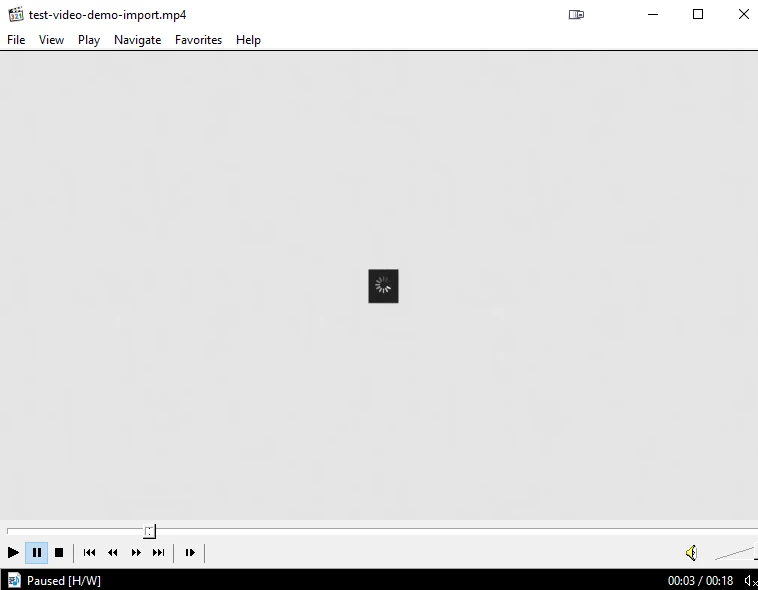
The screenshot above is the 'worst' lag I got in one of my several test publishes. Usually I don't see the white screen; in most cases it goes from one slide to the next but with the loading icon coming up for a second in between transitions.

It should be noted that the loading icon only occurs when I am transitioning to a .cpvc or video object file. If I start a project with a .cpvc or video object, the loading icon doesn't appear when I open the published video.

Some of the things I tried:

  • Used two different computers.
  • Tried recording shorter video demos.
  • Started new projects to make sure it wasn't a corrupted project file
  • Saved and used files from my desktop.
  • Tried both inserting a slide with .cpvc file, and also adding the video demo as a video object on the slide.
  • Instead of starting a slide with the video demo, I started it with an image and then added the video object so that it's all in one slide, but the lag still occurs.
  • Tried different video qualities, bitrate encoding settings.
  • Playing the published video with different media players.

The video demos I'm recording are only 1280 x 720px. Below are the settings I use:
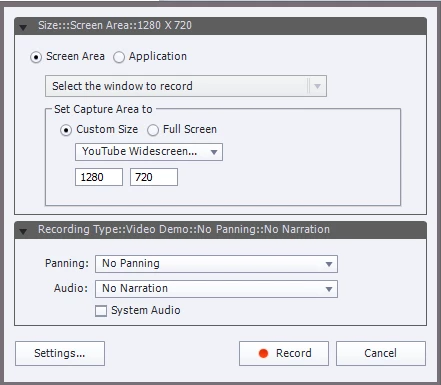
Any advice?

    This topic has been closed for replies.

    3 replies

    RodWard
    Community Expert
    Community Expert
    July 13, 2018

    These types of delays before initiating playback are usually just related to the speed of your internet connection.

    Are you sure you are not just expecting the video to begin playing immediately even though it needs to download a buffer amount first?

    What is the filesize of these videos?

    Participant
    July 13, 2018

    Thanks for replying. The size of the videos are only <5MB.

    However I'm not streaming the video on YouTube, I've been viewing them on a video player on my computer to view the published project before uploading. It's a weird lag because I can rewind and pause the video on the player to actually see the loading icon, as though it was an embedded object in my video.

    FYI, in the screenshot of my post, the 18 second video consists of an image on a slide for the first two seconds, and then a video demo for the rest of the 16 seconds. Upon opening the file, the video plays just fine, except for the loading icon that appears at the 3 second mark each time I play the video.

    Participant
    June 9, 2020

    Has there been any follow up to this?  I'm experience the exact same thing and it's quite frustrating. I'm using Captivate 2019 on an Windows 10 machine, 64 bit. I'm storing the files directly on my computer. I'm inserting a CPVC slide into a capivte project and every time, when I play the project and the presentation reaches the CPVC slide, there is a brief pause and the loading icon appears for just a moment and then the video plays.


    I've been trying to resolve this for days, so any help anyone could offer would be deeply appreciated!


    Thanks,

    Doug