
Inspiring
July 24, 2017
Question

Captivate 2017 Navigate Visited Slides Only NOT working

  • July 24, 2017
  • 1 reply
  • 263 views

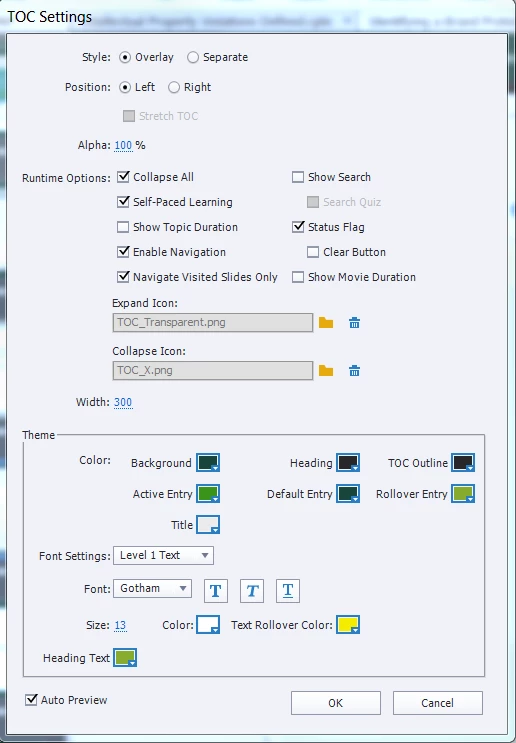
Captivate 2017 Version 10.0.0.192 - I've set up the TOC so that users can only navigate the visited slides.  It all works fine until user Reloads the page from the browser.  Here are my settings:
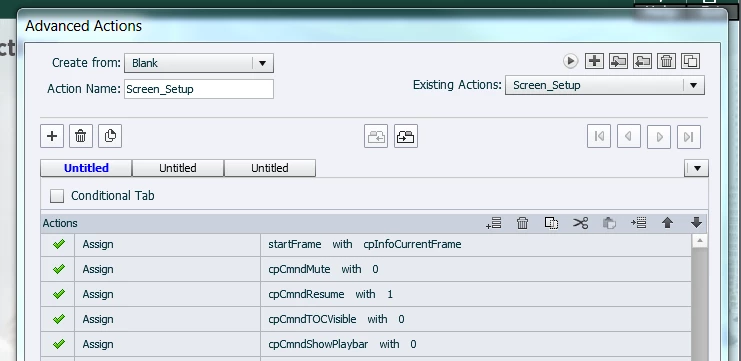
I'm using a custom navigation and an Advance Action with the following settings:
Why would Reloading the page stop the TOC navigation?

Thanks

This topic has been closed for replies.

1 reply

Inspiring
July 24, 2017

After further investigation, I noticed that Reloading the page is actually clearing all of my User Variables.  That's regardless of whether I select Ok or CANCEL below.

Lilybiri
Legend
July 24, 2017

Variables are always reset when you restart a course. What you are showing is the dialog box for bookmarking, which allows the user to restart from the file they left in the previous attempt. If you want to keep the values of the variables, you need to use JavaScript and local storage to store and retrieve those variables.