Known Participant
June 15, 2017
Answered

Captivate 2017 on a mac. Why does the dropdown to select device views appear sometimes and the icons with breakpoints appear at other times?

  • June 15, 2017
  • 1 reply
  • 234 views

I would rather see the icon view like this:

icons


This is what I get instead:

dropdown


I am going through a Lynda.com course and when they start a new responsive course the icons appear and I get the dropdown. 

Thanks for your help!
    This topic has been closed for replies.
    Correct answer Lilybiri

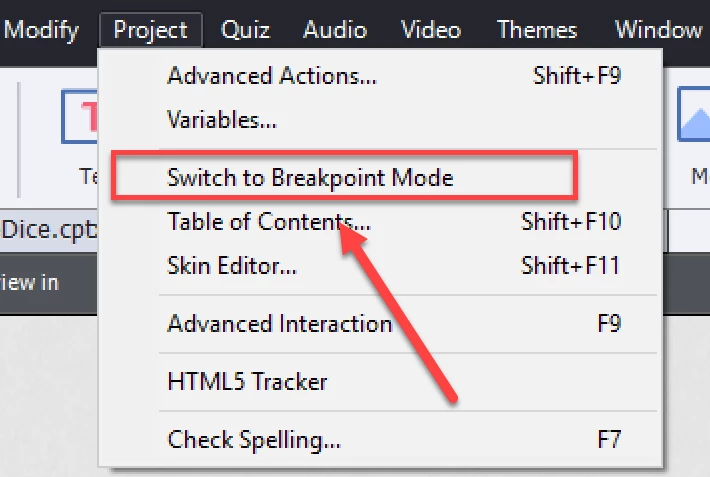
    First view is when you develop a responsive project using Breakpoint views, second screenshot when using Fluid Boxes. The last is default when you start a new responsive project in CP2017. To switch to Breakpoint view development, open the Project menu and choose the option 'Switch to Breakpoint Mode'

    I blogged about the difference and other features:

    Captivate 2017's gems - Captivate blog

    When you open a responsive project developed in a previous version it will automatically open in Breakpoint Mode.

    1 reply

    Lilybiri
    LilybiriCorrect answer
    Legend
    June 15, 2017

    First view is when you develop a responsive project using Breakpoint views, second screenshot when using Fluid Boxes. The last is default when you start a new responsive project in CP2017. To switch to Breakpoint view development, open the Project menu and choose the option 'Switch to Breakpoint Mode'

    I blogged about the difference and other features:

    Captivate 2017's gems - Captivate blog

    When you open a responsive project developed in a previous version it will automatically open in Breakpoint Mode.

    Known Participant
    June 15, 2017

    Thank you! All makes sense now.