


Known Participant
June 25, 2021
Question

Captivate 2019 assets message - Third Party Online Services

  • June 25, 2021
  • 1 reply
  • 214 views

I uploaded Captivate 2019 about two months ago and am taking a Captivate Fundamentals course in Udemy. When I started the chapter on the Assets button in the upper left corner of the screen, an interesting message appeared: 
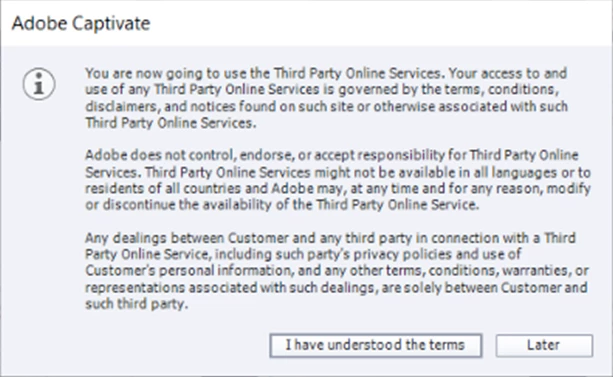
Why did this message appear? Which button should I click? And there was no button to close Captivate. I had to use Ctrl/Alt/Delete to close Captivate.

    This topic has been closed for replies.

    1 reply

    RodWard
    Community Expert
    Community Expert
    June 26, 2021

    It means the 'Assets' are not from Adobe but another third-party company that supplies them.  It's just a legal disclaimer saying that if anything bad happens after you decide to use these third-party assets then Adobe isn't at fault.


    If you want to go ahead to look at the Assets then you click the "I have understood the terms" button, otherwise click the other button.

    Known Participant
    June 28, 2021

    Since my last post, Captivate 2019 has been closed. After reading your response, I opened Captivate 2019 and created a new blank project. I clicked the Assets button and clicked the "I have understood the terms" button. A screen displays with links to Assets, Discover, and Downloads. The screen can only be dragged to the left or right and the screen cannot be minimized of displayed as full screen. There are so many unusual behaviors in this link, I'd wonder if you can provide me with a link to the "Third Party Online Services" company for their assistance. 

    Lilybiri
    Legend
    June 29, 2021

    The Assets panel allow to use and insert free assets. A more complete explanation to be found in this blog:

    http://blog.lilybiri.com/4-tips-assets-panel


    Maybe the resolution of your monitor doesn't allow to show the complete panel. Do you not see the buttons at the bottom of the panel?  If that is the problem, can you try to lower the display percentage or the resolution setup of your screen?