
Captivate 2019 Error - Entry Point Not Found
I recently tried updating my Captivate 2019 to the latest version, though before the update could make it to 100%, there was an "update failed" error message. After that, when I try to open up Captivate I receive an error message titled "Entry Point Not Found" It looks like this -
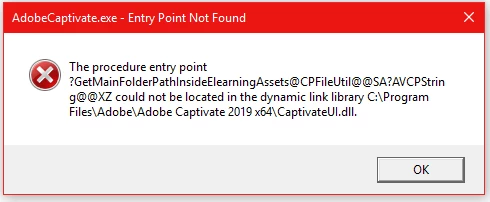
I'm not entirely sure what this error means, so I decided to try and re-install Captivate 2019. Though, after the installation, I've come across the issue where the Captivate Window is simply blank. An error noted on this Adobe help page - https://helpx.adobe.com/captivate/kb/captivate-installation-blank-page-sign.html
I've tried to run both of the files from the first two links on that page, though niether of them work. I receive an error which says - "The Installation cannot continue as the installer file may be damaged. Download the installer file again."
I'm not sure if the setup.exe files under the "Install via Help > Updates" would work for me, since I can't even open Captivate in the first place.
Has anyone run into this issue or found a workaround for it?
Thanks.


 AdChoices