
Known Participant
December 20, 2018
Answered

captivate 2019: how to change the slide titles

  • December 20, 2018
  • 2 replies
  • 1650 views

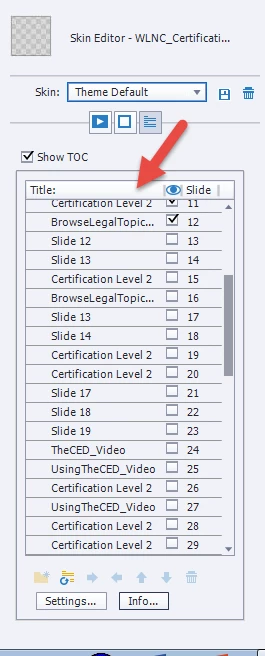
HI. Is there an easy way to delete and re-set the title's for the slides in a Table of Contents in Captivate 2019? 

Since enabling the TOC, I have since updated individual slide names but the TOC continues to show the old names.... I assumed that the TOC titles would auto update to match the changes but this is not happening. Thanks.
    This topic is closed to new replies. Start a new post to keep the conversation going.
    Correct answer RodWard

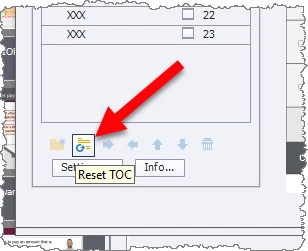
    There's a reset button at the bottom of the TOC Settings dialog.

    2 replies

    RodWard
    Community Expert
    RodWardCommunity ExpertCorrect answer
    Community Expert
    December 20, 2018

    There's a reset button at the bottom of the TOC Settings dialog.

    Minka316Author
    Known Participant
    December 20, 2018

    oh my gosh!  Thank you so much. It worked.

    Have a great day.