Known Participant
October 3, 2018
Question

Captivate 2019 issue with updating a template

  • October 3, 2018
  • 1 reply
  • 344 views

I have noticed that Captivate projects created with 2019, cannot be opened with 2017 (not good). So, I upgraded to the 2019 product. With all of our projects, we use a custom template to control what is recorded and the sizing (1280 x 720). The template created in the older version loads properly. However, some of the features appear to be different and slightly off.

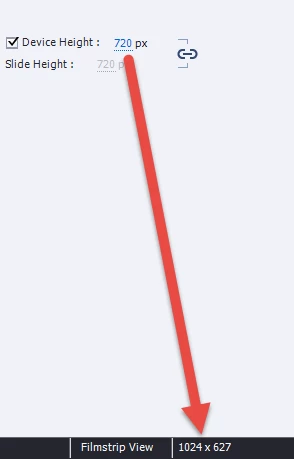
Issue 1: The device height says 720px, but the display shows 627?

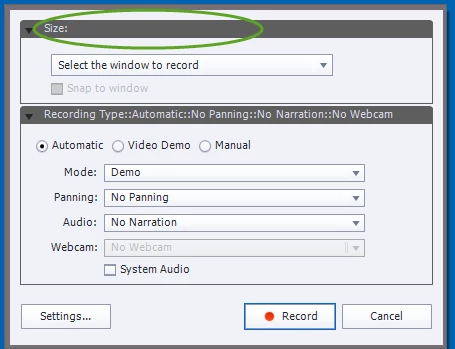
Issue 2: the recording size is empty? Not sure what the issue is here, but it used to be locked at 1280 x 720.

What am I missing?
This topic has been closed for replies.

1 reply

Lilybiri
Legend
October 3, 2018

Templates are buggy since a while if you talk about a cptl file. Mostly you

just need a custom theme. Upgrading a theme can also be tricky. You seem to

point at a responsive project, is that correct? Fluid boxes have changed a

lot in the new version.

Known Participant
October 3, 2018

We are using the template to record a software simulation, actually. Yes, I just need a custom theme. We then create a simulation that is interactive (responsive project of sorts). It appears that I will need to use a separate app to set the size of the app and then select it from the "Select the Window to Record" option. We are not using the fluid boxes in these type of projects. This template has served us well for all the previous versions, but it appears that 2019 has broken it. So sad. :-(

RodWard
Community Expert
Community Expert
October 3, 2018

If you are capturing screens of a software application, exactly HOW can it be 'responsive'?  The screens are either going to remain the same aspect ratio and simply scale up or down with the width of the available screen, or else they will be distorted and become somewhat unreadable.

Responsive projects are NOT a good match for screen capture courses.  The objects on screen need to move around and rearrange themselves for true responsiveness.