Nancy@work
Participating Frequently
December 9, 2022
Answered

Captivate 2019 not grading quiz questions

  • December 9, 2022
  • 1 reply
  • 1015 views

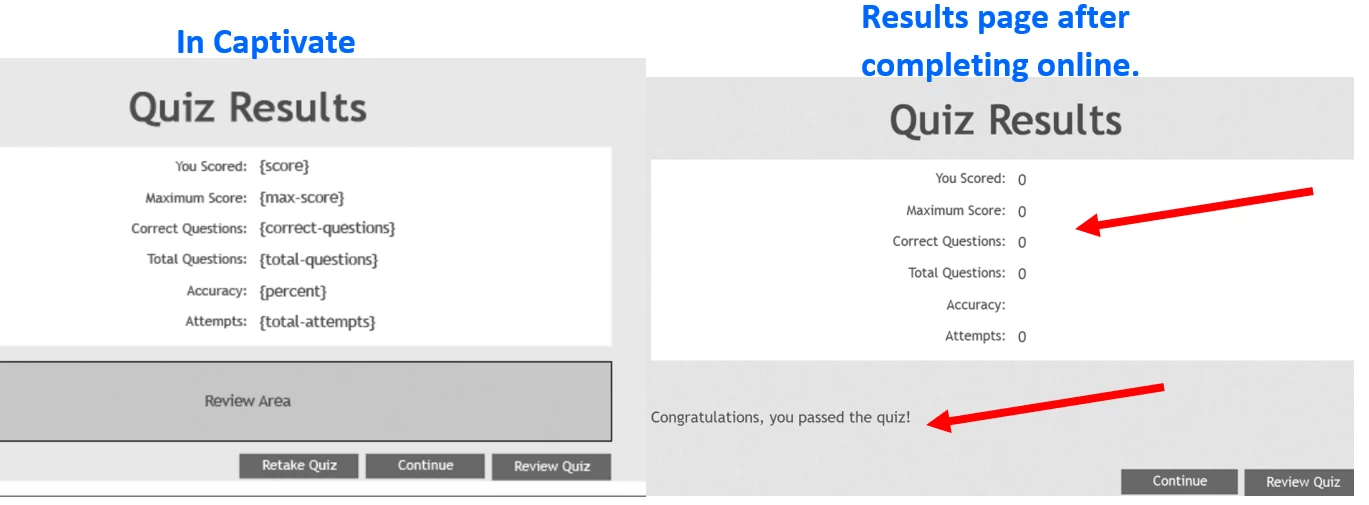
Hello! The SCORM is not grading and registering a 0%/Fail in our Moodle LMS. I was blaming the LMS but now I think there is some obscure setting in Captivate that I am missing. It must be grading because it has the "Congrats, you passed", yet the formulas do not seem to be calculating. I have compared the Quiz Pref to ones that are working and just cannot find a reason.

Does anyone have any ideas? Any help would sure be appreciated. Thank you! Nancy


    This topic has been closed for replies.
    Correct answer Lilybiri

    Did you add the Results slide manually? If you have real quiz slides, not the Knowledge slides, the results slide is added automatically. That is the reason for my first question. Knowledge check slides are automatically reset when returning to the slide. You may have a look at this blog post, where I compared both types of slides.

    https://blog.lilybiri.com/knowledge-check-slides-tips

    Something you need to check as well is the Advanced Interaction panel (F9). If you have scored quiz slides the total Quiz score appearing on top of that panel should show a significant number, not zero. Since you get a Passed score it could mean that the learner has 80% of the total score, which is also zero if the total score is zero. This could happen when you took out the score for each  quiz slide, which is less probable IMO. Complete description of that panel can be found in:

    https://blog.lilybiri.com/advanced-interaction-panel-q-and-a

    From my experiences in this forum and elsewhare I realized that this panel is unknown to a lot of Captivate developers and that is a real pity.


     

    1 reply

    Nancy@work
    Participating Frequently
    December 9, 2022

    I just discovered that while testing online it would not retain the answer. I would get the "correct" message but if I went back to the question, there were no answers selected.

    RodWard
    Community Expert
    Community Expert
    December 9, 2022

    Make sure your question slides are actually Graded quiz questions and not just Knowledge Check questions.  KC questions do not have a score and do not report to the quiz.  They also reset when you leave the slide, which means there will be no answer retained when you return to that same slide.


    To easily check whether or not you have scored quiz questions, go to Project > Advanced Interaction dialog and look down the Points column to find quiz questions that have scores.  If you cannot find any, you may have the wrong types of question slides.


    Nancy@work
    Participating Frequently
    December 9, 2022

    Oh goodness, how did I miss something so basic! Thank you so much!