
Participating Frequently
January 23, 2023
Question

Captivate 2019 project on Mac not previewing

  • January 23, 2023
  • 2 replies
  • 1363 views

Just installed my new Mac version of Captivate 2019 (11.8.0.710), created a simple two-slide project and when attempting to preview (HTML 5 in Browser), it fails immediately with a Publish failed message.


When I attempt to Preview from this slide, an Adobe AIR window opens, with an OK button. When I click the OK button, I'm presented with a black screen. Very unsatisfying.


My publish settings are the default:
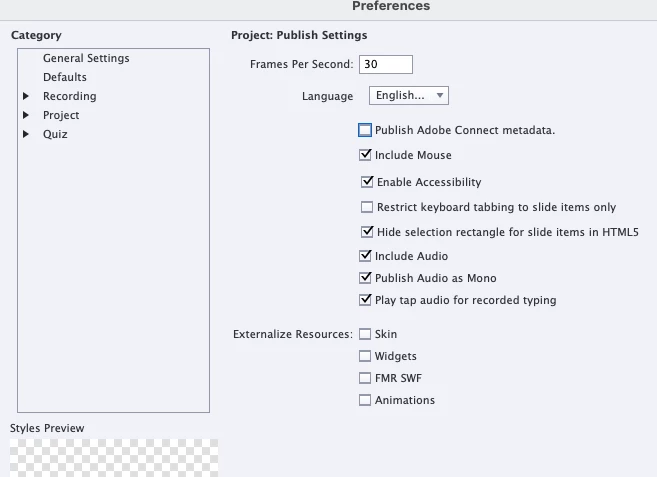
 

I'm on macOS Monterey version 12.6.


I know a lot about Captivate on PCs and am guessing there's some macOS setting I need to tweak.


Any help is most appreciated.


Thanks!

This topic has been closed for replies.

2 replies

Lilybiri
Legend
January 23, 2023

Of course I may misunderstand but you also mention that Preview HTML in Browser, which is the only valid preview for non-responsive projects (see Rod's answer) is also failing. That points to more than just the loss of Flash player support. If it was a responsive project, all Preview methods should work. Serious UI bug but that is my personal opinion.

First of all: which browser is your default browser? I guess it is Safari (Apple brand) and that browser is indeed often is tricky. Did you try with another browser like Chrome or Firefox, and with the same result?


Participating Frequently
January 23, 2023

Yes, I'm only using Preview HTML in Browser, and my default browser is Chrome. This is a non-responsive preoject.


I've tried previewing in Firefox and the result is the same. 


I think my next step is to reboot my mac, which I haven't done since installing Captivate.

Any more thoughts are most welcome.


Thanks!

Lilybiri
Legend
February 4, 2023

Still narrowing down where the problem may be.

My co-worker has a personal Mac that is nearly identical to our corporate Macs. He installed the same Captivate DMG on his personal machine and successfully previewed using HTML 5 in Browser.


Therefore, our issue is most likely due to the corporate image on our machines that are preventing access to localhost.


In general, what has to be "open" in order to launch a localhost on a Mac?

I'll reach out to our IT folks to figure this out.


You probably are correct: access to localhost may be prevented by your IT people.

I also wonder if you are using Adobe fonts in the project? If yes, did you add 'localhost' to the domains when publishing? 

RodWard
Community Expert
Community Expert
January 23, 2023

There is unlikely to be any tweak on either Apple OS or even Windows that will fix this.


Adobe AIR is Flash-based technology.  It is still in Captivate 2019 because this version of Captivate predates the death of Flash in 2020. Using anything other than Preview as HTML5 in Captivate is really using Flash technology.


But as almost everyone on this forum well knows, neither Adobe or Apple has had reason to support Flash technology for some years now. 

https://community.adobe.com/t5/air-discussions/adobe-air-support-beyond-2020/td-p/10381868

That's the most likely reason why you're not seeing anything.


Participating Frequently
January 25, 2023

Thanks, Rod. Yes, I decided not to move off of Monterey for the reasosn you cited. Thanks forr your feedback.