
Participant
October 2, 2018
Question

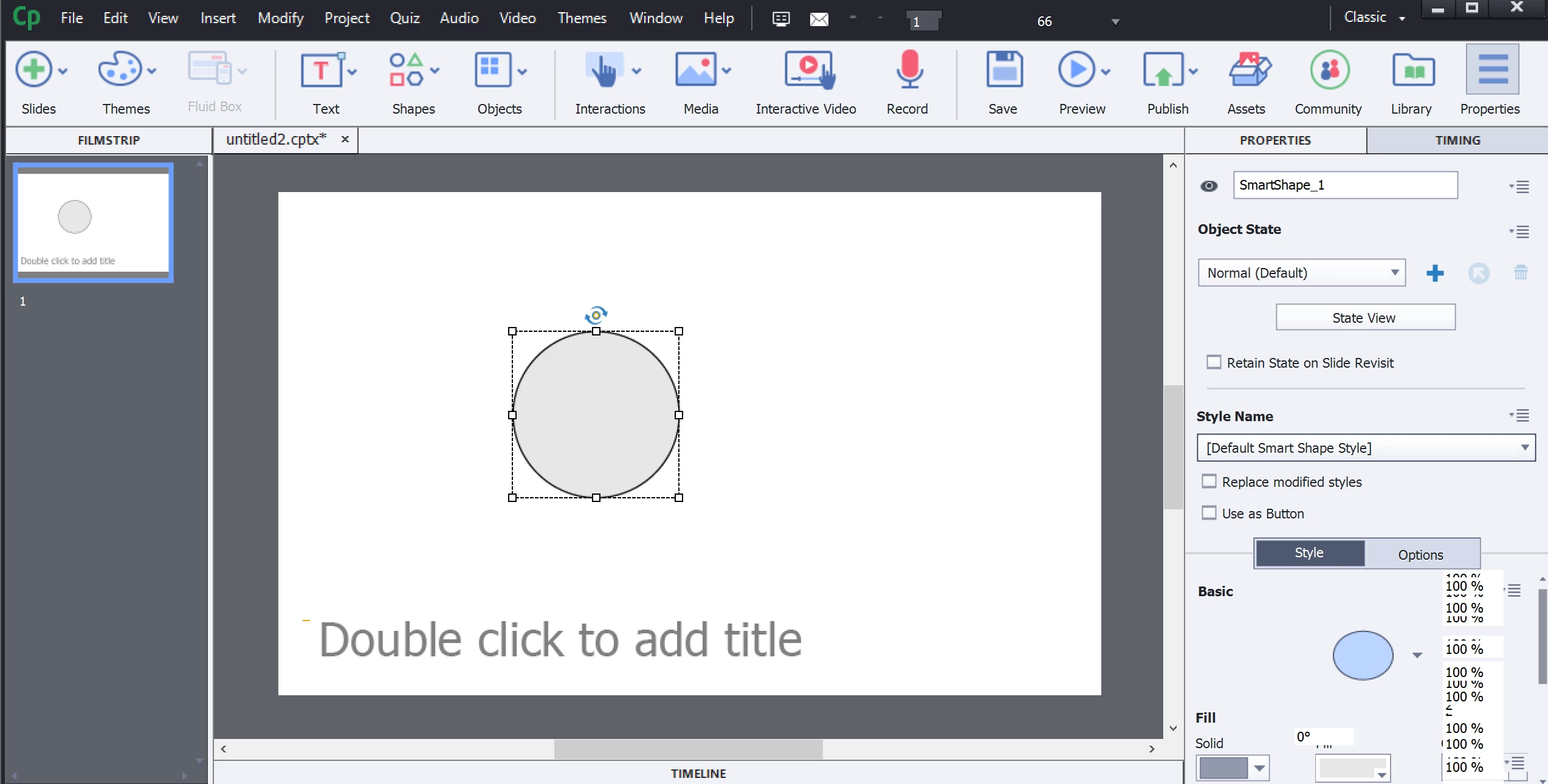
Captivate 2019 - Properties Inspector Broken/Glitchy

  • October 2, 2018
  • 1 reply
  • 456 views

I recently downloaded Captivate 2019 on my PC (running Windows 10).  I am trying create a new project and perform the simplest of functions (e.g., add shape), but the Properties Inspector won't fully load.  Whenever I try to scroll down past what is visible above the fold, a glitch occurs.  I can move the scroll bar, but the content does not appear.  Some of the text fields start duplicating and the lagging effect makes the rest of the options in the panel impossible to access.  How do I fix this so I can use the Properties Inspector?
This topic has been closed for replies.

1 reply

RodWard
Community Expert
Community Expert
October 2, 2018

First thing I would do is go into Edit > Preferences and select the option for Enable Custom Workspaces, then reboot Captivate.

If the issue persists, it sounds to me somewhat like a display driver issue.  Is there any way you can check to see whether or not your display drivers are up to date?

What are the specs for your PC?  Is it reasonably powerful or is it perhaps a bit lacking in resources (RAM, CPU etc).

Lilybiri
Legend
October 2, 2018

Check also if you have the patch. Recent version is 11.0.1.266.