


Participant
October 28, 2022
Question

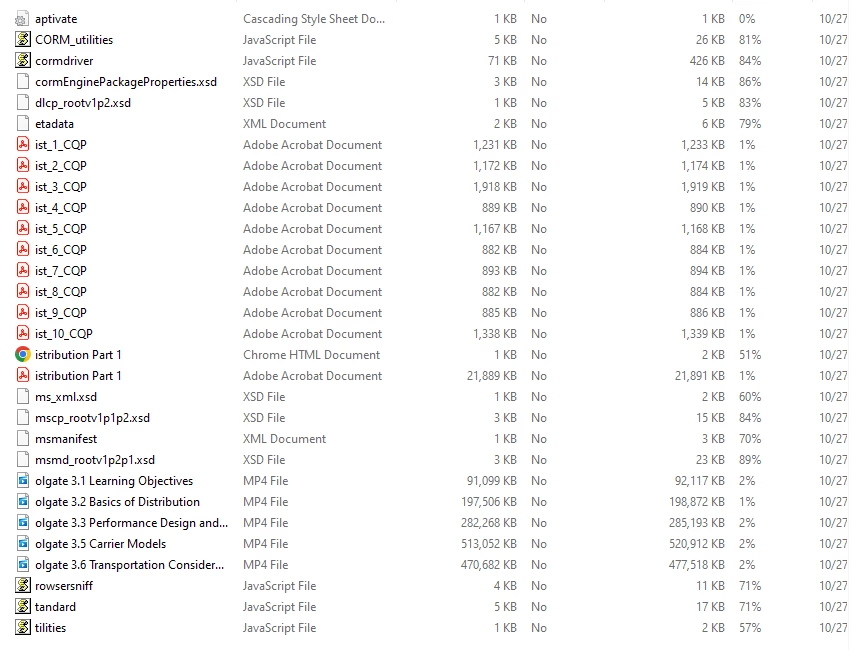
Captivate 2019 Publishing Bug - 1st letter of every file removed in Zipped Folder

  • October 28, 2022
  • 2 replies
  • 73 views

Windows 11 running Captivate 2019 11.8.0.586.


I was having issues uploading my project to SCORM cloud because it couldn't locate the imsmanifest file. Well that's because when I published the project to my computer, Captivate deleted the first letter of every file in the zipped folder. This leads to msmanifest existing instead. I tried publishing the project again and got the same result. What are possible solutions here?
    This topic has been closed for replies.

    2 replies

    RodWard
    Community Expert
    Community Expert
    October 31, 2022

    I have 11.8 on one of the machines I use and I have never seen this issue. I would suggest there must be something non-standard about your installation.  Is there anything unusual about the way your system is set up?  If not, first thing I would try is a complete removal and re-installation of Captivate.

    Lilybiri
    Legend
    October 29, 2022

    Such a weird problem! I know that 11.8 has several bugs, reason why I didn't install it myself but this is the first time your issue has been signalled. That probably means it is rather unique and could be related to something on your system. Did you try to contact Adobe Help yet?