Known Participant
May 5, 2021
Answered

Captivate 2019 Variable Length Limit?

  • May 5, 2021
  • 1 reply
  • 900 views

In Captiate 9 I set up a quiz to display all of the incorrectly answered questions, along with the correct and incorrectly selected response. I did this using javascript and then assigning the collected data to a Captivate User variable so I could display the information in a text object. While this code still works in a test updated from Captivate 9 to Captivate 2019, I can't duplate the work in a fresh test built in Captivate 2019. 


While the javascript is working as expected, when I assign the data to my Captivate User variable, it is truncated to only 50 characters. In my working example, originally produced in Captivate 9, I can have many more characters without any problem. 


What must I do, in Captivate 2019, to expand the size of the Captivate User variable?

 

    This topic has been closed for replies.
    Correct answer Lilybiri

    Displaying characters has not changed, but I suspect you didn't change the default length of 50 characters when inserting the variable using the X button in the Properties panel. That has always been necessary.

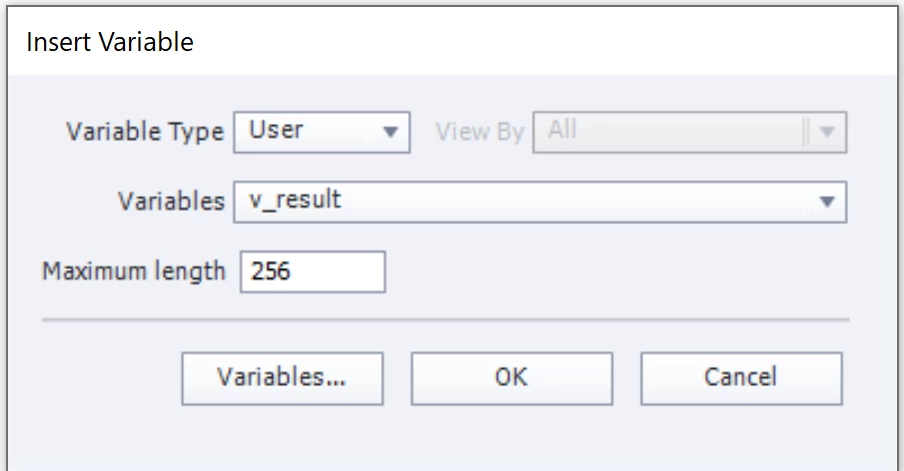
    Default value for maximum length is now set to 50, in older versions it was lower. I have changed it in this screenshot to 256.

    Normally Mac

    1 reply

    Lilybiri
    LilybiriCorrect answer
    Legend
    May 5, 2021

    Displaying characters has not changed, but I suspect you didn't change the default length of 50 characters when inserting the variable using the X button in the Properties panel. That has always been necessary.

    Default value for maximum length is now set to 50, in older versions it was lower. I have changed it in this screenshot to 256.

    Normally Mac

    Kodiak100Author
    Known Participant
    May 5, 2021

    Your suspicions have been confirmed! I wan't using the insert dialog, I was just typing the $$varname$$ in the field which resulted in the default size. 

    Thanks for your quick help!

    Pete