
Known Participant
January 26, 2011
Question

Captivate 4 scoring in Peoplesoft ELM

  • January 26, 2011
  • 1 reply
  • 5486 views

Hi all--hoping to get some help with our issue:  our Captivate courses are not scoring correctly when taken through our Peoplesoft ELM.  Our Articulate courses ARE scoring correctly.

The Captivate courses are scoring correctly on the ELM/Component piece, but not on the ELM/Activity piece--which is what shows up on all the training records and reports.


Here are the Quiz Preference settings we are using to publish our Captivate courses:
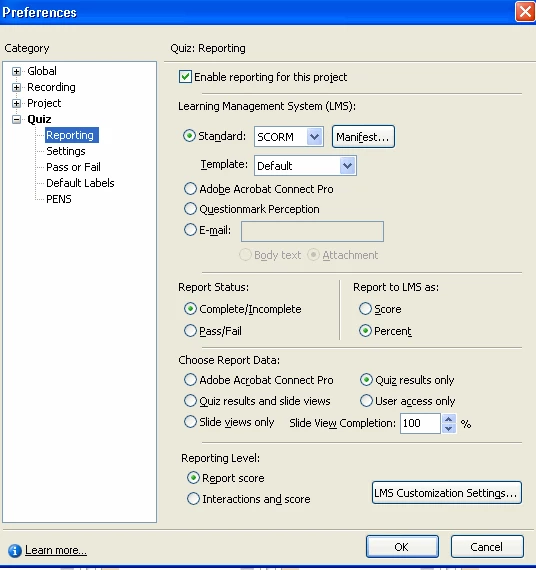
We have tried different combinations of these settings, but none seem to make a difference. Peoplesoft either records the score of the Activity as '80' or '100'...nothing else, no matter what the component/real quiz score is (80, 90 or 100).  The mastery score was set at 80, then we unchecked that, but still no change.

Does anyone have any suggestions?

This topic has been closed for replies.

1 reply

NDBrendaHAuthor
Known Participant
January 28, 2011

Ok...I've been testing different scenarios for most of 2 days.  I've found with a quiz of 8 questions, when I set the mastery score to '70' and the Pass/Fail score to 80, everything scores correctly, giving me a score of 88 (correct score with one wrong) on both the activity and the component.

However, with a quiz of 10 questions, the same settings don't work.  I get a score of 80 on the activity and 90 on the component (90 was the correct score).

I also tried inserting a short (.1 second) blank slide between the last question slide and the question Results slide.  That made no difference.

Please help!

NDBrendaHAuthor
Known Participant
February 3, 2011

I've found it!  Here's the answer:

Set the following in your Captivate -->Preferences:

Project-->Start and End-->Project end options = Close Project

For SCORM 1.2 courses:

Quiz-->Reporting-->Report Status = Complete/Incomplete

Quiz-->Reporting-->Report to LMS as = Percent

Quiz-->Reporting-->Choose Report Data = Quiz results and slide views

Quiz-->Reporting-->Reporting Level = Interactions and Score

Quiz-->Reporting-->Manifest:  make sure the SCO-->Mastery score is either unchecked or <= the Pass or Fail score/percent

These settings work wonderfully for our Peoplesoft ELM LMS!  We are now scoring correctly 100% of the time.

However, because you are reporting the 'Quiz results and slide views', you will need to make sure none of your slides are longer than the pause time (assuming you have an interaction pausing your slide).  This is because Captivate doesn't count a slide as being 'viewed' unless it's completely viewed for the length of time assigned (3.0 seconds, 5.0 seconds, etc.  For those times when you need a longer slide for some reason (multiple clicks on one slide, for example), factor those slides into your Slide View Completion percent (for example, change 100% to 95%). This also applies to branching...be sure to set your Slide View Completion percent low enough to allow completion based on the minimum number of slides learners will view, no matter what branch they take.

NDBrendaHAuthor
Known Participant
February 3, 2011

:)