February 8, 2011
Question

Captivate 5 - Click Boxes

  • February 8, 2011
  • 1 reply
  • 308 views

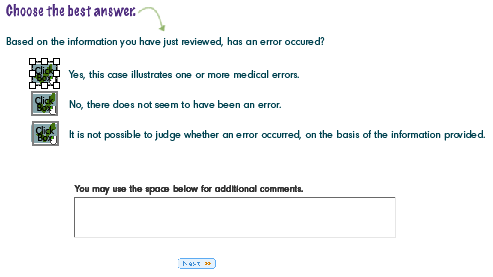
In my course, I have a page that consists of three different answers. The answers are opinions and the user can select any one of the three answers. I have placed click boxes over each answer. I set the click box to report and to "Include in Quiz". I check the box, "Report Answer" as well. With this done, what exactly will be communicated to the LMS? I did not set this up using the options in the Quiz menu. I also have a TEB that appears when a choice is made. This is to give the user the option to enter additional comments. I set this to be "Included in Quiz" as well. Same question, when reported, what will be reported? The comments?

Finally, I have a dozen or so more to do like what I have mentioned above. But, before I continue, I thought I would check in with the forum to see if I am on the right track.

Here is a screenshot.
Thanks!

vbcon007

    This topic has been closed for replies.

    1 reply

    Lilybiri
    Legend
    February 9, 2011

    Hello,

    I may be wrong, but thought I already answered a similar question

    It is not only a Captivate question but depends on the LMS too. Since I'm using Blackboard I can only answer for that LMS. If you set up the reporting (when publishing as SCORM) to report not only the score but also the interactivities, you will get a complete report in the LMS per user. You will see which click box has been clicked, but be sure to give the click boxes a meaningful label if you want to 'translate' the report of the LMS. A good preparation is having a look at the Advanced Interaction view (F9). In Captivate 5 (not in previous versions) the label of all slides and objects will be visible. This is pretty much the same way LMS will produce its reports. I hope this clarifies how 'our' LMS is working, but sorry for the repetition, not every SCORM-compliant LMS has the same reports.

    As for the TEB, if it is scored and reported, it is easier: you will see the input from the user. But even then, I always will label each TEB with a meaningful name. I once blogged about my being a labeling freak, here is the link:

    Reasons for labeling in Captivate

    If you do not mind another suggestion: try out the LMS-reporting with a small project, so that you can look for the best configuration (expecting some other questions about those?) and you will be able to do some finetuning!

    Lilybiri