Answered
Captivate 5 for Mac: how to get rid of the small star combined with every mouse click
Hi,
I recorded a new project and only use the mouse, without klick sounds or highlight box before clicking.
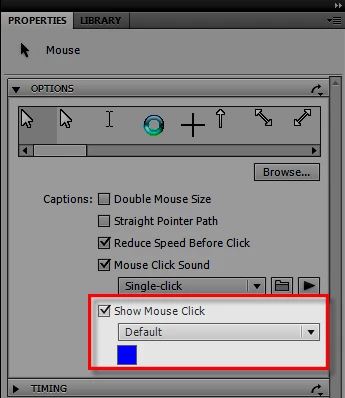
When I watch the recorded project, Captivate shows me before every mouse click a small star, which I don't want to see.
Unfortunately, I can't do a screenshot of it, because it's not visible on the slide at the beginning. It shows just second before the mouse clicks. I'm sure, I can turn it off, but I don't know where.
Thanks for all help, Miriam


 AdChoices