February 18, 2011
Answered

Captivate 5 publishing error message: not enough memory

  • February 18, 2011
  • 1 reply
  • 1695 views

Hello,

i'm in the course of testing the program for use in our company, and i'm struggling over this error message in Captivate.

I'm asking the question here in the hope that someone has an idea whether this error message is an problem of my workstation, or a problem of Adobe Captiva 5:
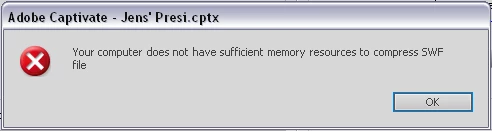
This message occurs while publishing the swf file, after compressing and inserting swf file tags, while saving swf file (according the messages in the publish progress bar window).

The Project conditions are

  • 20 slides
  • Every slide contains around 5s of captured full motion video and audio
  • 10 Text captions, some zooming, and 3 text animations

I'm using

  • Adobe Captivate 5 (Trial)
  • Windows XP SP3 (Dell Latitude E6410, Core i5, 4 GB RAM)

Tried to change some settings, close programs, reboot. Always the same message.

This is not an real old or weak system. As i'm using other programs successful here with huge pictures and videos, and as for sure i won't get an computer upgrade from the company only for that, this post is the last chance for the program ...  ;o)

Thanks for any ideas ...

Ulrich

    This topic has been closed for replies.
    Correct answer RodWard

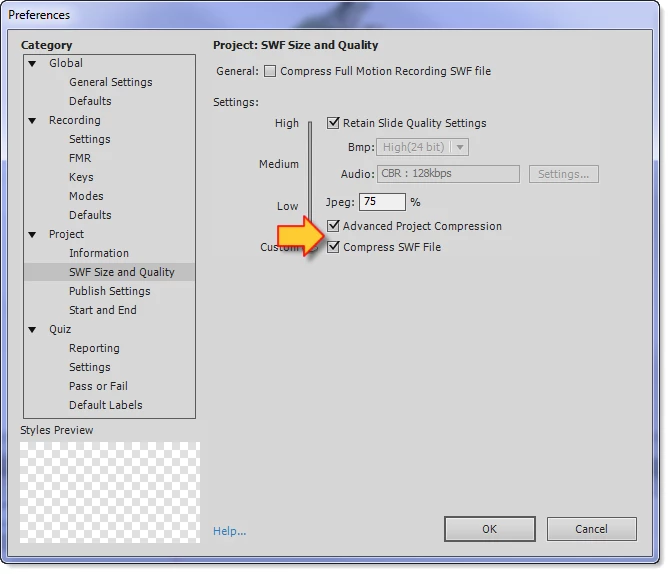
    Try unticking the options in Preferences > SWF Size and Quality for SWF compression and see if that allows you to publish properly.  Sometimes one of these preferences can be triggering this type of error on a given hardware setup.  First try unticking both, then if that works, try ticking one at a time to see if any compression option is open to you.

    1 reply

    RodWard
    Community Expert
    RodWardCommunity ExpertCorrect answer
    Community Expert
    February 18, 2011

    Try unticking the options in Preferences > SWF Size and Quality for SWF compression and see if that allows you to publish properly.  Sometimes one of these preferences can be triggering this type of error on a given hardware setup.  First try unticking both, then if that works, try ticking one at a time to see if any compression option is open to you.

    February 18, 2011

    That was the point !

    Deactivating the tick for "Compress SWF File" only resolved the problem.

    Missed that during try to alter settings.

    Great !!!

    Thank you very much ! Project can go on ...

    Ulrich