Known Participant
July 29, 2010
Question

Captivate 5 - Scene Transitions don't work

  • July 29, 2010
  • 1 reply
  • 923 views

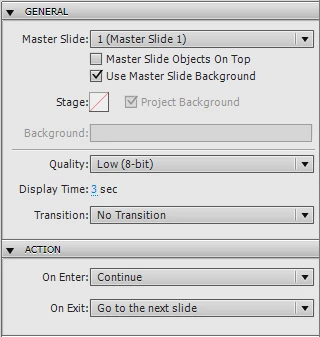
After I create a file I select Preview/Project from the toolbar. Captivate 5 plays the current scene and stops. It does not move to the next scene. I don't know why this happens. As you can see below, here are the settings I'm using for Action properties:

On Enter: Continue

On Exit: Go to next slide

Is there something else I need to do that I'm not doing?

Will appreciate your feedback. Thanks,

Morton Redner
morton.redner@sbcglobal.net

    This topic has been closed for replies.

    1 reply

    Captiv8r
    Legend
    July 29, 2010

    Hi there

    What objects are on the slide? If you have a Click Box, Button or Text Entry Box on the slide it will pause the slide until it has been interacted with by the user.

    Cheers... Rick

    Helpful and Handy Links

    Captivate Wish Form/Bug Reporting Form

    Adobe Certified Captivate Training

    SorcererStone Blog

    Captivate eBooks

    Known Participant
    July 29, 2010

    Yes, I actually discovered that on my own after I posted this. I was working with buttons. And although I had disabled the buttons, the "Pause After" property remained set at its default value. I had to reset the Pause After value to zero.

    Thanks!

    Morty