Participant
June 27, 2016
Question

Captivate 5 - text animations - setting preferences?

  • June 27, 2016
  • 3 replies
  • 184 views

Hi all

I use text animations in captivate presentations currently.  I'm on Adobe Captivate 5  I understand how and where to set them up.  My question is

Is there a way to create a specific text animation style, font, speed, etc as a preference?

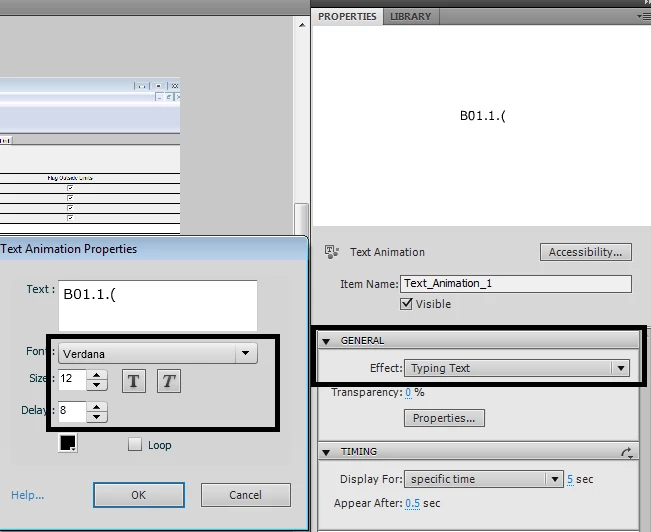
Captivate allows you to set preferences to highlight boxes and message windows, colors fills and all that, but for some reason it always defaults to

typing text animation

Font New times Roman

size 10

speed 5

I want a different style, font, size and speed and I want to set it once and then apply it to all of the text animation that I add.

Anyone know?

Here's a screen shot
    This topic has been closed for replies.

    3 replies

    Participant
    June 28, 2016

    So the short answer is No.

    Unfortunately the use of both Captivate V5 and the text animations is not a decision that I am in charge of.  I'm just a peon hoping for an easier way to do my own job.

    Thanks for your answers though.  I will pass on the information about the obsolete-ness of the animations. :-D

    Lilybiri
    Legend
    June 28, 2016

    Answered similarly yesterday, but message didn't make it to the forum.

    To add to Rod's comments, you also have to know that from Captivate 6 on, the styles for all objects are part of the Theme (as are the master slides, skin and from 8 on the Theme Colors).  Styles are no longer part of the Preferences.  Effects have been added, and most of them are compatible with HTML5 output, they can be used to replace the old Text Animations (which are still available, but strongly recommend not to use them anymore).

    RodWard
    Community Expert
    Community Expert
    June 27, 2016

    Text Animation objects are actually a type of AS3 widget.  It's not a simple object like a text caption or Smart Shape.  So you don't get the same options as to using Object Styles to choose defaults.

    In any case, you are on a version of Captivate that is now quite old.  Most Captivate authors looking to the future of their e-learning are choosing NOT to use Text Animation objects because these are not compatible with HTML5.  I know your version of Captivate doesn't publish to HTML5, but when you DO get around to upgrading one day, that version will definitely be capable of HTML5 output. 

    However, your text animations will then be obsolete.  So I would suggest you move away from using them now in order to save yourself extra work when later updating these courses.