Known Participant
January 26, 2015
Answered

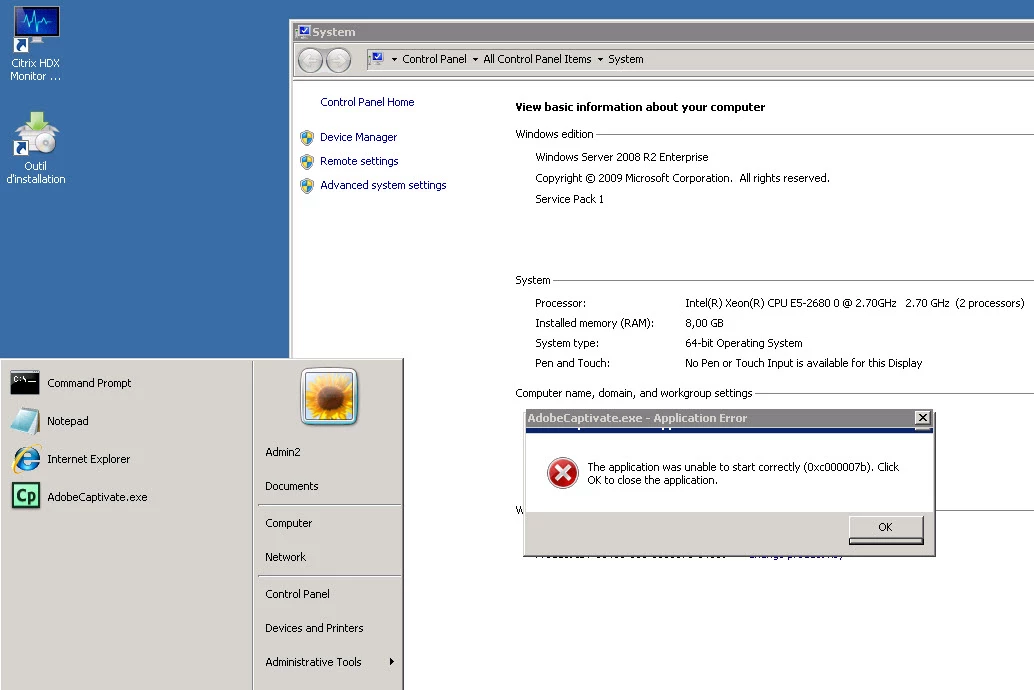
Captivate 6 Errors: Missing file libwinpthread-1.dll and The Application was unable to start correctly (0xc000007b) on Windows 2008 R2

  • January 26, 2015
  • 2 replies
  • 1445 views

Hi,

I have a problem with Captivate 6 installation on Windows Server 2008 R2. I have 2 different scenarios where I tested but the result is same.

1- I used AMEE (Application Manager Enterprise 3.1) to create the installation Package to deploy through SCCM 2012.

Notice that the current package works fine on Windows7 (x86 & x64) but not on 2008 R2 due to an error after I try to launch Captivate.exe application.

The error states that there's a Missing file: libwinpthread-1.dll and if I copy and made a registration of this .DLL file then it sends another error saying: The Application was unable to start correctly (0xc000007b) so it never let me launch the application.

2- Now if I install the package directly from the Original sources(CD) without creating any AMEE package after completing the installation I still have the same error about the DLL missing file.

Is there any fix or workaround to install Captivate 6 on Win2008 R2 ?

Thanks in advance & kind regards.

This topic has been closed for replies.
Correct answer Sreekanth_S

Wow, No replies so far !! 

Any one ?? 


This seems to be a generic issue, not related to Captivate. Here is one site that lists the possible causes.

How To Fix Libwinpthread-1.dll is Missing / Not Found Error

I don't know whether their solution works though.

Sreekanth

2 replies

mikessannd
Participant
February 18, 2015

THERE IS MORE THEN ONE WAY TO FIX 0XC000007B APPLICATION ERROR
here some solutions :

http://finally-found-the-solution.blogspot.com/2015/02/how-to-fix-0xc000007b-application-error.html

Captiv8r
Legend
January 26, 2015

Hi there

I'm not certain Captivate 6 even works with Windows 8. Did you say Windows 8 *SERVER*? If so, that might also throw a huge wrinkle in the mix.

This is one where you are probably better off contacting Adobe Support.

Cheers... Rick

derspinneAuthor
Known Participant
January 27, 2015

Hi,

Sorry, my bad I thought that it was obvious that saying Windows 2008 there was only Server versions. But indeed our OS is : Windows Server 2008 R2 Enterprise.

I should have put that on the title, anyway I really appreciate your observation and I already contacted our support with no answer by now.

Thanks & kind regards.

derspinneAuthor
Known Participant
February 13, 2015

Wow, No replies so far !! 

Any one ??