Inspiring
August 7, 2013
Answered

Captivate 7 App Publisher for Mac

  • August 7, 2013
  • 1 reply
  • 1008 views

Hi,

I'm experiencing some issues with trying to use the App Publisher for Captivate 7 on a Mac.  Things do not show up like demonstrated in this video from adobe (Package the HTML5 content for devices using Adobe Captivate 7 App Packager).  Here's a quick screencast on what I'm running into

Also, here are the details on how the project was published prior to importing into the App Publisher.
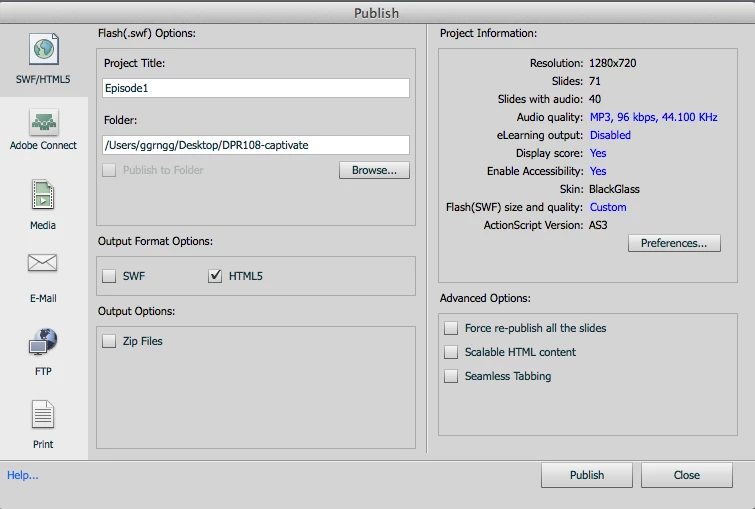
Any ideas or solutions?

Thanks for your help.
    This topic has been closed for replies.
    Correct answer dcccgeek

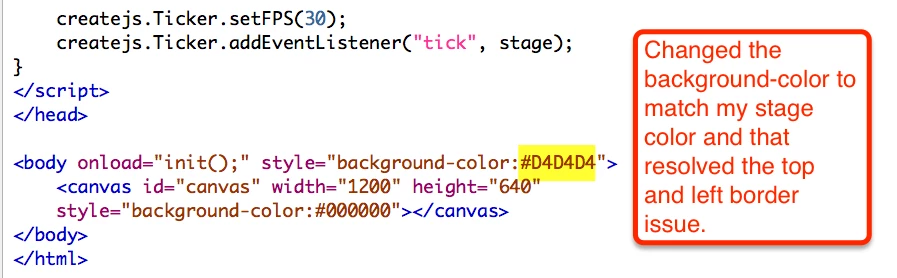
    Ok, figured out that the border problem is because of how Flash is publishing from the Toolkit for CreateJS.  When I opened the html source code and changed the background-color in the body tag to match my stage/slide background color the borders went away.  Totally thought it was an App Publisher issue.  Now, if I can only figure out why the contents of my slides don't show up in App Publisher I'll be in a good place.

    1 reply

    Anjaneai_Srivastava
    Adobe Employee
    Adobe Employee
    August 7, 2013

    Hi,

    I saw your video attached here -- It's cool that you are a C++ instructor ( I had flashback on my good old days ).

    Now lets get to your problem--

    To get rid of the border that is coming around your project (not animation but project)

    1) Go to Source CPTX file.

    2) Project -- Skin Editor-- border

    3) Uncheck Show borders.

    Regarding your animation, Can you share the same with me if possible so that I can check it. if not,

    probably check if there are any border properties in it. Can you try to insert this Widget/Flash animation in CP source file rather than separately in the published output?

    Thanks,

    Anjaneai

    dcccgeekAuthor
    Inspiring
    August 7, 2013

    Hi Anjaneai,

    Thanks for the ideas.  The dark gray border at the top and bottom are ok, the problem is the light gray border I get.  I tried the Skin Editor, but it only removed the top and bottom dark gray borders, not the gray.

    I can't use the Flash on the slide because I need them to be HTML 5 compliant.

    Here's a link to my blastoff animation files that were exported from Flash using the Toolkit for CreateJS.

    dcccgeekAuthorCorrect answer
    Inspiring
    August 9, 2013

    Ok, figured out that the border problem is because of how Flash is publishing from the Toolkit for CreateJS.  When I opened the html source code and changed the background-color in the body tag to match my stage/slide background color the borders went away.  Totally thought it was an App Publisher issue.  Now, if I can only figure out why the contents of my slides don't show up in App Publisher I'll be in a good place.