
Known Participant
August 28, 2013
Answered

Captivate 7 - Can I create a button that triggers video?

  • August 28, 2013
  • 1 reply
  • 4655 views

Hello,

I am 99.5% positive this is a dumb question, but can I install a button that plays video as its action on success? I know I could use the skin to allow the user to play the video, but I want the video to play after the user hits a button I created.  I don't see "play video" as an option for action on success.
This topic has been closed for replies.
Correct answer HaridossR1234

Hello ,

Okay Now i understand your workflow .

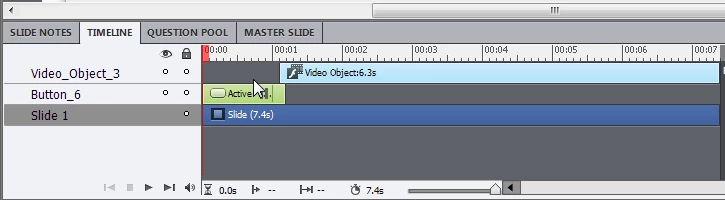
You can insert a Button and Video on same slide . After inserting the video set it to autoplay from the properties panel.

Now adjust the pause of the button along with video in the timeline as shown in image below .

Thanks and Regards

Himanshu Satija


Hi rscharfer,

You can also try the below.

1) Insert an event video with autoplay.

2) Uncheck its visibility from PI.

3) Insert a button, make its success action as show Video_Object_1.

In the published output, when you click the button, movie will start playing. Please let me know if it solves your problem.

Regards,

Haridoss

1 reply

HimanshuSatija
Adobe Employee
Adobe Employee
August 28, 2013

Hello ,

You can simply insert a button on that slide and on action of that button you can use Open Url or File ( Properties Panel Of button) and then you can select the file (Video) which you want to open .

Make sure that after publishing that video must be there in the published folder , If it is not there you need to manually paste in published folder.

Hope This Helps

Thanks and Regards

Himanshu Satija

RodWard
Community Expert
Community Expert
August 28, 2013

Himanshu,

I think the user is wanting to play a video on the Captivate slide, not in a separate window.  If so, your solution will not work.