
ArthurTLee
Inspiring
April 1, 2014
Answered

Captivate 7 error: could not open course

  • April 1, 2014
  • 1 reply
  • 480 views

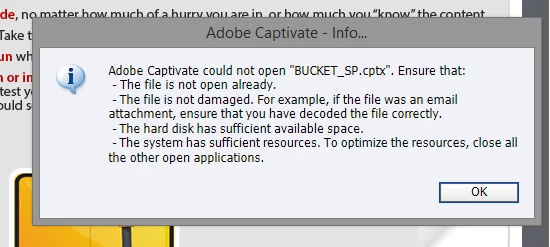
So we have been working on several courses at a time. All are working fine, but this afternoon, my assistant went to save the course. It took a really long time to save. Captivate seemed to be dragging, too, so she shut down and restarted the computer. When she tried to open this particular course again, she got the following pop-up box:

Captivate could not open (file). Ensure that... (see image). I can only assume the file was damaged somehow when it took a long time to save since none of the others apply.This is a large file and has taken us a couple weeks to work on. I am hoping there is a way to salvage this. I've become increasingly frustrated with Captivate shutting down on us, dragging, etc.

Thanks in advance,

Arthur
    This topic has been closed for replies.
    Correct answer Evan Berrett

    This post by RodWard gives you really the only ways it is possible to recover it: http://www.infosemantics.com.au/adobe-captivate-troubleshooting/recover-corrupt-project

    I encountered this a couple weeks ago and nearly lost a project that I had worked on for months. It won't be easy to restore it since you will likely need to use the last option in Rod's article which is a bit of trial and error, but after about two hours of frantic attempt after attempt after attempt, I finally got it. This has taught me, and should you as well to use the Project backup function of Captivate now.

    1 reply

    Evan Berrett
    Evan BerrettCorrect answer
    Inspiring
    April 1, 2014

    This post by RodWard gives you really the only ways it is possible to recover it: http://www.infosemantics.com.au/adobe-captivate-troubleshooting/recover-corrupt-project

    I encountered this a couple weeks ago and nearly lost a project that I had worked on for months. It won't be easy to restore it since you will likely need to use the last option in Rod's article which is a bit of trial and error, but after about two hours of frantic attempt after attempt after attempt, I finally got it. This has taught me, and should you as well to use the Project backup function of Captivate now.

    RodWard
    Community Expert
    Community Expert
    April 2, 2014

    Chiming in here...

    When people are having these types of instability issues with Captivate, the most common reason is that their system is not set up properly.

    See these posts:

    http://www.infosemantics.com.au/adobe-captivate-troubleshooting/setting-up-your-computer-to-work-with-captivate

    http://www.infosemantics.com.au/adobe-captivate-troubleshooting/how-to-set-up-preferences