BHSUID
Known Participant
June 18, 2015
Answered

Captivate (7) not changing slides

  • June 18, 2015
  • 2 replies
  • 565 views

I have an standard advanced action that is supposed to hide 4 objects on a slide and then jump to a different slide. Captivate hides the 4 objects but will not change slides. I have tried using various options for getting to the correct slide. The most specific being Jump to Slide X. Captivate refuses to change the slide. Does anyone know what might be causing this behavior and how to fix it?
This topic has been closed for replies.
Correct answer Captiv8r

Thank you for trying to help. I realize that the conditional action doesn't make sense but neither does the current set up not working. I also realize that there are more efficient ways for setting up the project. I am working with what was given to me and I do not have time to recreate it. I am simply trying to get it to work correctly.


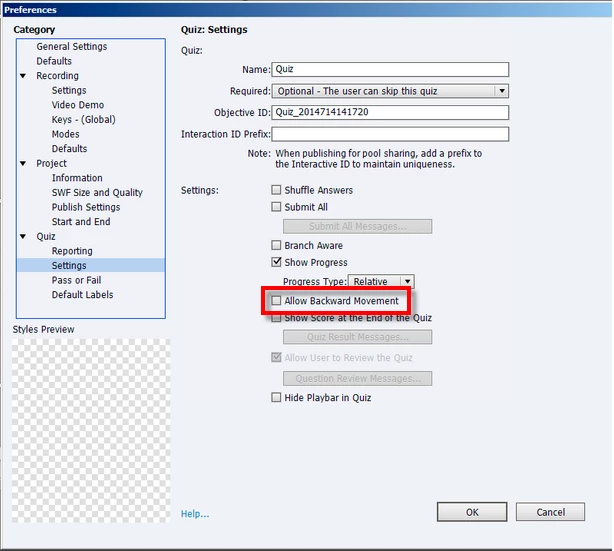
In that screen shot where you show your quiz settings, does it fix things if you enable "Allow Backward Movement"?

Cheers... Rick

2 replies

Captiv8r
Legend
June 18, 2015

Hi there

Do you have a quiz? If so, you might have a question slide that is between where you are and where you are trying to go. If your quiz settings are set to require questions to be answered, Captivate won't allow you to skip over that unanswered question.

Cheers... Rick

BHSUID
BHSUIDAuthor
Known Participant
June 18, 2015

Unfortunately there aren't any slides between the two. The above screen shot is from slide 30 and as you can see it is telling captivate to go to slide 29. I am using this same AA (to hide and go back a slide) throughout the project and none of them work.

I have tried go to previous slide, last slide visited and jump to slide and Captivate will not go back a slide.

Lilybiri
Legend
June 18, 2015

Could I see a screenshot of the advanced action, and can you tell me which event you are using to trigger that action?

BHSUID
BHSUIDAuthor
Known Participant
June 18, 2015

I am using a smart shape as a button and triggering the advanced action on success.

Lilybiri
Legend
June 18, 2015

Try to add Continue, I don't know what the action is On Enter for the slide you are jumping to.

How did you test? I'm asking this because if you use Preview, from this slide, and since the slide it should be jumping to is before the present slide, it will not be generated in the temporary output.