
Inspiring
July 29, 2013
Question

Captivate 7 Partial Scoring: Cannot set partial scores

  • July 29, 2013
  • 1 reply
  • 1816 views

Sorry.  Probably missing something obvious.

I've a multiple choice quiz in Captivate 7.

What I'm after is on each question there's a correct answer, and the rest are wrong to various degrees.

So for correct answer: 10 points

for next best answer: 7 points

for next best answer: 3 points

for worst answer: 0 points.

To implement:

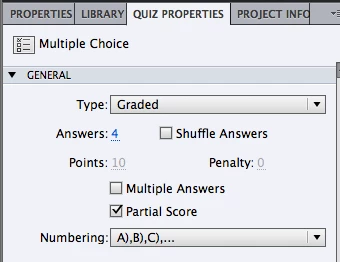
  • set quiz type to Graded
  • on overall quiz properties I ticked "Partial Score"
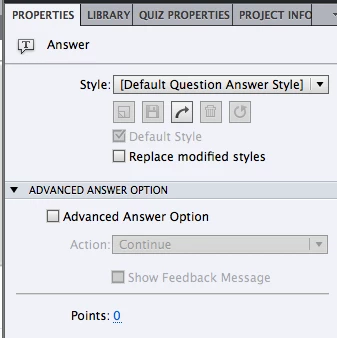
  • then on each answer I expected to be able to enter a Points score under "Advanced Answer Option".

However I cannot save any change to the Points score for any answer other than the first one.  For all the others nomatter what I type as score gets changed to zero when I press Enter.

What am I missing? 

TIA

Steve

Quiz Properties: 
Answer Properties (with score that never changes): 
This topic has been closed for replies.

1 reply

RodWard
Community Expert
Community Expert
July 29, 2013

You can only allocate partial scores to answer options that are marked as correct.  In you case, if you want to allocate varying scores to a number of possible answers, then you would need to select the Multiple Answer option in Quiz Properties, then select each available answer option to receive a partial score, select it as a correct answer, and then you'll be able to allocate a score in the Properties tab.

If you don't like the way this is implemented, log an enhancement request.

Inspiring
July 29, 2013

Thanks for the response RodWard.

Unfortunately if you select Multiple Answer then the learner is free to select more than answer per question.  Which is not wanted.

Will lodge a request.

Interestingly I noted that I was able to enter a score for the other answers if I made it negative. So I can penalise wrong answers but not reward partially wrong (or right).

Inspiring
July 29, 2013

Ha!

Just typed up the enhancement request.  Site crashed with an error on submit.

So guess that bit works as well as the tool itself