Participant
June 6, 2016
Question

Captivate 7: problem in quiz score slide when use Multiple Answers question

  • June 6, 2016
  • 1 reply
  • 512 views

Hi everyone:

I have a problem with the Quiz Score slide, at the end of my quiz pool. I have 5 questions, one of them is a Multiple Answers question (4 answers: answer 1 and 4 are correct).
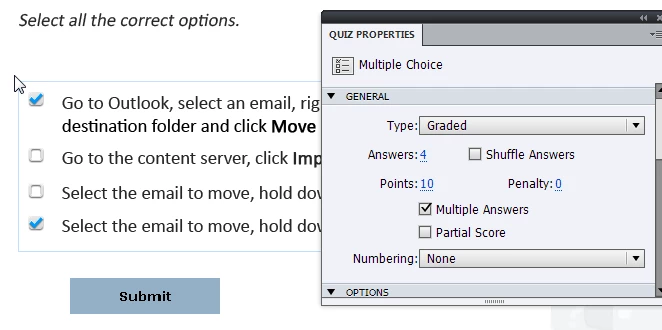
No penalty in any question. All question points are 10. Maximum Score: 50.

Now the problem:

I fail all question, and I mark in the Multiple Answer question only one answer correct (e.g. answer1 ... remember, the question is correct when answer1 and answer4 are checked).

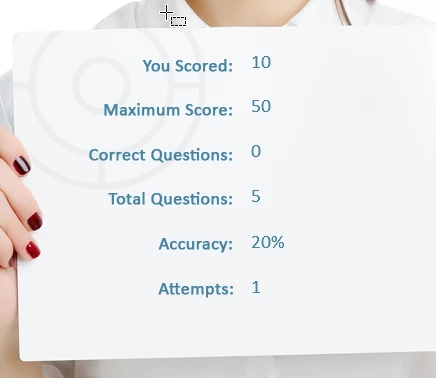
The Quiz Score slide show me: You Score: 10 Correct Questions: 0 and Accuracy: 20%.

What is the problem?.. the question is fail (only one correct question is checked), and all of the rest question are fail... why my score is 10 and accuracy 20% and 0 correct questions? How is possible?
Anyone can help me please?... or is it a bug?

Thanks a lot in advanced

Gonzalo

    This topic has been closed for replies.

    1 reply

    Lilybiri
    Legend
    June 6, 2016

    Can you post a screenshot of the Advanced Interaction panel (F9)?  I know that if you check Partial scoring, and the question is not answered correctly, the question will be counted in the total number of correct questions. However the score and the percentage are linked: cpQuizInfoPercentage is calculated from cpQuizInfoPointsscored and cpQuizInfoTotalQuizPoints. Somewhere you got a score of 10 points and the percentage is calculated correctly.

    Can you also mention the complete version number of 7? I have it still installed and can double-check, although I never did see a result like this and have created lot of quizzes with 7. I am on 7.0.1.237. I created a sample file with 5 questions, one being a MCQ with 2 correct answers. Taking it as you described resulted in a correct score slide.

    GonzaloNMAuthor
    Participant
    June 7, 2016

    Thanks for you quickly answer. Here the screenshot

    My version is Captivate 7.0.1.237 too.

    In the Advanced Interactions panel, in the row of this slide,  appears 10 points in the "Negative points" column... but in the properties panel, Penalty field is 0. Can I change this "Negative point" number in other panel or other properties?

    Thanks again.

    Gonzalo

    Lilybiri
    Legend
    June 7, 2016

    Something is wrong with Quiz slide 5, indeed. Instead of looking for a solution with the present quiz slide, would recommend to delete it (you can copy/paste the answer and other texts to a text container in the scratch area outside of the stage) and recreate it again. That will probably be the quickest 'cure'. If the problem reproduces again, something is corrupt in the file, would be worse.