
Inspiring
December 8, 2016
Answered

Captivate 7 - Show/Hide problem

  • December 8, 2016
  • 2 replies
  • 595 views

Hello,

I'm using Captivate 7 on Windows 7.

I have a question regarding this slide:
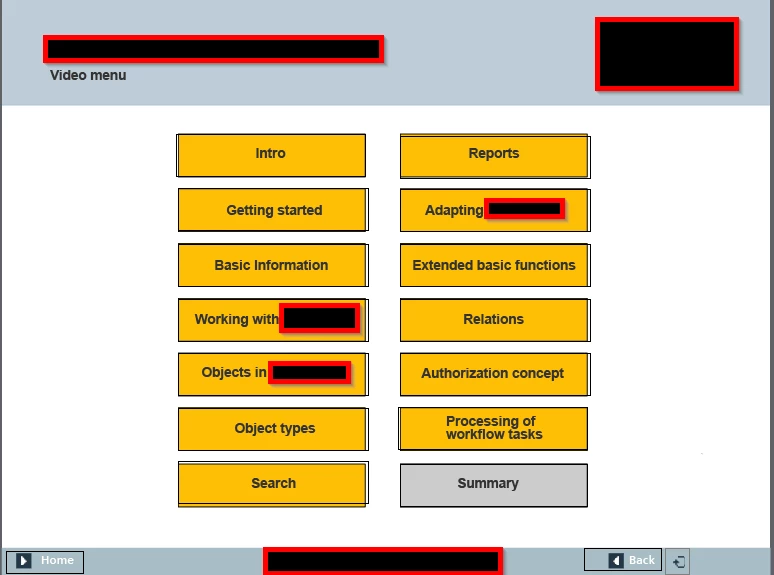
If you click on any of the orange boxes there is an advanced action that opens a URL, assigns a variable with a number and then hides an object (the orange box, there is a grey behind it so the user knows which buttons he/she has clicked). This works just fine, the URL opens and the orange box is hidden.

The thing is that I want the "Summary" box to show when the user has clicked all orange boxes, until then it should be hidden. This does not work. I have "Conditional advanced action" on the slide itself saying to show "Summary" when variables 1-13 are correct so to speak. It works if I click all the orange boxes and then click back and then forward again. I assume this is because the "On enter" script is only read on entering the slide.

Does anyone have an idea on solving this? Let me know if you need any more information.

Thanks you in advance.

Best regards,

Patrik

This topic has been closed for replies.
Correct answer Lilybiri

You need to combine the present standard advanced action, triggered by the buttons, with the conditional action from the On Enter event in one conditional action with two decisions:

First decision 'Always' is a mimicked standard action because of the condition that always results in True:

   IF 1 is equal to 1

     Assign v_one with 1        v_one being the Boolean variable associated with this button

      Open....

      Hide....

Second decision 'CheckVars' checks the value of all the variables and shows the Summary if all are equal to 1

    IF v_one is equal to 1    AND

        v_two is equal to 1   AND

        ....

        v_last is equal to 1

    Show Summary

2 replies

Lilybiri
LilybiriCorrect answer
Legend
December 8, 2016

You need to combine the present standard advanced action, triggered by the buttons, with the conditional action from the On Enter event in one conditional action with two decisions:

First decision 'Always' is a mimicked standard action because of the condition that always results in True:

   IF 1 is equal to 1

     Assign v_one with 1        v_one being the Boolean variable associated with this button

      Open....

      Hide....

Second decision 'CheckVars' checks the value of all the variables and shows the Summary if all are equal to 1

    IF v_one is equal to 1    AND

        v_two is equal to 1   AND

        ....

        v_last is equal to 1

    Show Summary

Inspiring
December 9, 2016

Hello Lilybiri,

Thank you for the reply.

I'm pretty sure your suggestion is what I have in place and which didn't work. Please have a look and confirm if I misunderstood you.

On the slide I have an advanced action "on Enter".

It looks like this:

Y1 being the variable and X1 being the name of the corresponding orange box.

I then have an action when all the variables are assigned and the orange boxes are hidden that looks like this:

You can't see all variables but I assure you they're there Y1-Y13 (13 orange boxes). When all are assigned the Summary box and button should be shown and enabled. Is this what you meant?

Best regards,

Patrik

Lilybiri
Legend
December 9, 2016

You misunderstood indeed.  May I summarize what my idea was about your use case:

  1. When a button is clicked, the orange cover has to be hidden, a user variable associated with that button has to be toggled from 0 to an URL has to open. Once an object is hidden, it remains hidden. I don't see why you need that On Enter action at all. Even if the user leaves that slide and re-enters it is superfluous since the orange cover has alread been hidden by clicking the button.
  2. Once all buttons have been clicked something (Summarize) has to be made visible.

You need only to use the Success events of the buttons, nothing else. For those buttons you need that conditional action with only TWO decisions which I described above.  You need such an action for each button, use the Duplicate action button to create them. The duplicates have to be edited, but editing is limited to the first decision 'Always': you will have to replace the variable, the name of the box to hide, the name of the URL to open. The second decision 'CheckVars' is identical for each button. The result will be that once the last button is clicked, the second decision will be correct and 'Summarize' will be shown.

RodWard
Community Expert
Community Expert
December 8, 2016

What you are trying to do is a very common use case.

Take a look at this video tutorial:

Create a Dynamic Menu Slide in Adobe Captivate | Infosemantics Pty Ltd

It explains how to create a dynamic menu slide where a hidden button is shown after all other buttons on the slide have been seen.

Note that the Conditional Action that hides or shows the relevant feedback objects on the slides is executed in this case by the On Enter Slide event.  However, in your case, if the user is remaining on the same slide while clicking all these buttons then each of the buttons needs to execute a similar Conditional Action that has a final decision block to check whether all buttons have been clicked and if so will show the final hidden button.

Inspiring
December 9, 2016

Hello RodWard,

Thank you for the reply. I had a brief look at your video/s and understand what you mean. In your case you went to another slide when clicking the buttons, that works for me as well. In my case the user will stay at the one slide the whole time.

Could you please describe your solution for that case a bit more? Please see my answer to "Lilybiri" in this thread as well if that helps you in any way.

Best regards,

Patrik