Inspiring
November 6, 2013
Answered

Captivate 7 - Turn off mouse click and typing sounds

  • November 6, 2013
  • 1 reply
  • 3023 views

I am new to Captivate and on version 7. It should be obvious, but where do I turn off the mouse click and typing sounds for my project?

    This topic has been closed for replies.
    Correct answer Lilybiri

    This will tell how new I am to this. What is the "Options accordion"?
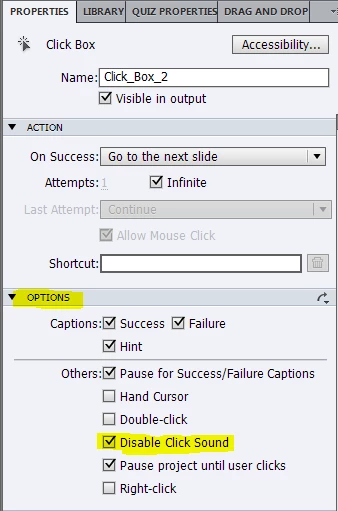

    1 reply

    Lilybiri
    Legend
    November 6, 2013

    Look in Edit, Preferences, Recording.

    Lilybiri

    NWNITT49Author
    Inspiring
    November 6, 2013

    I went there before I recorded. The following are unchecked:

    Camera Sounds

    Keystrokes

    There is no mouse click sound box.

    The sounds still appeared in my recoridng.

    Lilybiri
    Legend
    November 6, 2013

    Sorry, forgot the mouse. Go to a click box after recording (they will be inserted automatically !in Demonstration mode), in the Options accordion check 'Disable Click Sound', then use the small curved arrow, top right in that accordion to apply this to all click boxes. Click boxes are invisible, hence they don't have a 'style' in the Object Style Manager, that is why you cannot do it before recording.

    Lilybiri