Participant
August 14, 2014
Answered

Captivate 8: Button Text alignment, where did it go?

  • August 14, 2014
  • 2 replies
  • 2535 views

My work upgraded to Captivate 8. I am working with a former Captivate 7 file.

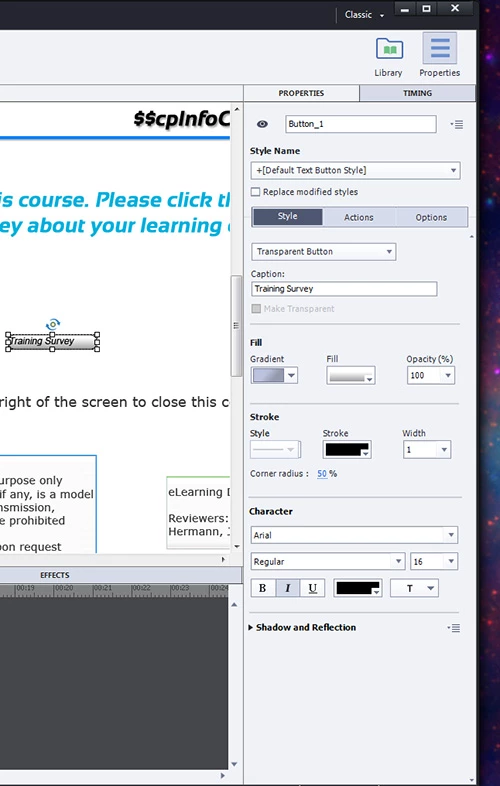
     When I clicked on a Transparent Button the font alignment jumped from centered to left. I cannot find anyplace to make the alignment go back to centered. Can someone tell me where to locate that feature/capability? It was very handy in Cp 7 to have it listed right below the Character properties. Now I have no idea where they moved it to as it does not appear to be a property anymore.
This topic has been closed for replies.
Correct answer Lilybiri

Text nor Transparent buttons had ever the option to align the button label, not even in previous versions, because they are centered.  If you have still CP7 installed, can you tell me where you found it? Just double checked although I was pretty sure.

Cannot explain why the alignment changed for you, only suspect it is maybe related with upgrading the project. Had never that problem until now, answering want to know where you found the alignment option in CP7? Alignment is available for all text containers like text captions and shapes. Since a shape can be used as a button, that is the only button I know where alignment can be changed. Of course you can create Image buttons and adapt alignment, but then it will be in the graphical application.

2 replies

nate.leavitt
Inspiring
August 4, 2015

Sometimes the text alignment controls get "lost" for me. In your screenshot, I'd like to refer to the Style and Options buttons near the top of the panel on the right: sometimes I have to press the Options button, then the Style button again, then the text alignment controls re-appear.

Lilybiri
LilybiriCorrect answer
Legend
August 15, 2014

Text nor Transparent buttons had ever the option to align the button label, not even in previous versions, because they are centered.  If you have still CP7 installed, can you tell me where you found it? Just double checked although I was pretty sure.

Cannot explain why the alignment changed for you, only suspect it is maybe related with upgrading the project. Had never that problem until now, answering want to know where you found the alignment option in CP7? Alignment is available for all text containers like text captions and shapes. Since a shape can be used as a button, that is the only button I know where alignment can be changed. Of course you can create Image buttons and adapt alignment, but then it will be in the graphical application.

MeFertigAuthor
Participant
August 15, 2014

Wow, okay you are correct. I pulled up a colleagues system who was not upgraded yet, opened a copy of that project, and there was/is no alignment feature for text inside buttons.

aligned instead of centered in the new project. I have no idea why the alignment changed with upgrading, but I'm swapping the buttons out for Smart Shapes to correct them moving forward. The system generated buttons (in quizzes etc) stayed centered. New buttons are also centered, it was only buttons I created previously that appear locked in left alignment. The reset style feature reverts the font type/size but not alignment. So the system does not seem to recognize that anything is off/changed with the converted buttons.

     Thanks! I thought I was missing something really obvious and could not figure out where/what it was.