
Participating Frequently
May 26, 2015
Question

Captivate 8 crashing program being recorded

  • May 26, 2015
  • 2 replies
  • 342 views

I've installed Captivate 8 on my Mac.  Although it seems Captivate is working correctly, when I attempt to create a software simulation (which I've done in earlier versions many times), once I begin to add text into fields, the original program hangs.  If I close captivate and force quit my program, Captivate gives me slides up until the point at which I attempted to enter text for the demo. 

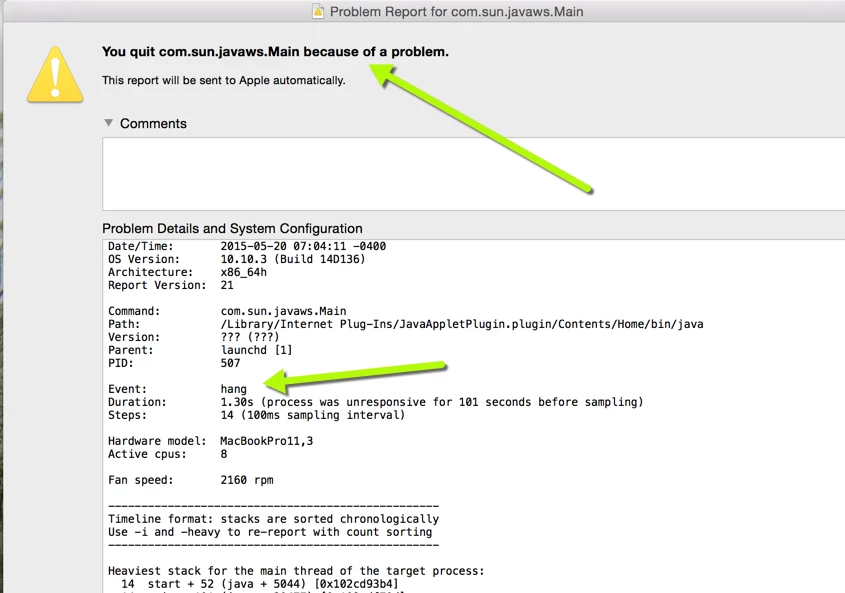
This is the beginning of the pages and pages of error presented when I shut everything down.  Any suggestions? 
This topic has been closed for replies.

2 replies

BDuckWorks
Inspiring
May 27, 2015

You said you're recording a software simulation, but didn't mention if it's web base (i.e. recording a browser) or an application (running is OS X). In any event, it appears the real issue is with Java.

I'd suggest running software update and make sure you have the latest version of Java installed.

Also, if the simulation is web based, you should try recording in different browsers. Of course, the best case is to record in the browser that most of your users have installed, but if that is the browser causing the crash.... what other option do you have?

If the simulation is for a desktop application, and it's Java based, you may need to use Captiv8r/Rick's approach!

eJHUAuthor
Participating Frequently
May 27, 2015

Sorry, you're right...it's a desktop application.  I've used earlier versions of Captivate with this same application, so didn't anticipate I'd have any problems with 8.  I'm going to play with the Java version running the application and see if that makes any change to Captivate.  Different Java versions have ramifications for the other program, but I might be able to work around those.  And, as you say, I may need to resort to Captiv8r's option!

Thanks for your help!

Ellen

Captiv8r
Legend
May 26, 2015

Hi there

I'm not sure about the Mac, but over in the Windows world we have observed certain applications for years that don't play well with Captivate's recorder. In those cases we normally recommend establishing a connection to a different computer. Then start the recording process and record the window where you are remotely controlling the other computer. That way the offending application and Captivate aren't sharing the same memory space.

Cheers... Rick