
Elle_CT
Participant
April 18, 2017
Question

Captivate 8 Failed Quiz not registering correctly in Chrome

  • April 18, 2017
  • 2 replies
  • 424 views

Good Morning, Team,

I need some help please. I found this post. My issue is very similar to theirs. Unlike the other elearning developer, I have the additional data (for my project) that you asked of the other developer. That post is - Quiz score not loading on Google Chrome

NOTE - we have no issues when the user passes the exam. Everything is hunky dory when they pass. It's when they fail that the sky begins to fall.

I have 5 elearning courses in Captivate 8. All have content slides with audio in the beginning of the course. Then I transition (with a Continue button) to the quiz (no audio). Three courses have 20 questions at 5 pts each. The other two have 15 questions at 7 pts each. All quizzes are set to 3 tries before the user is locked out. All quizzes are set at 80% to pass. All quizzes are SCORM wrapped on my company LMS (SuccessFactors).

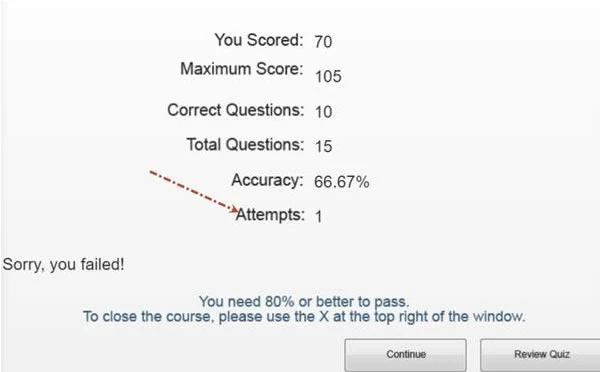
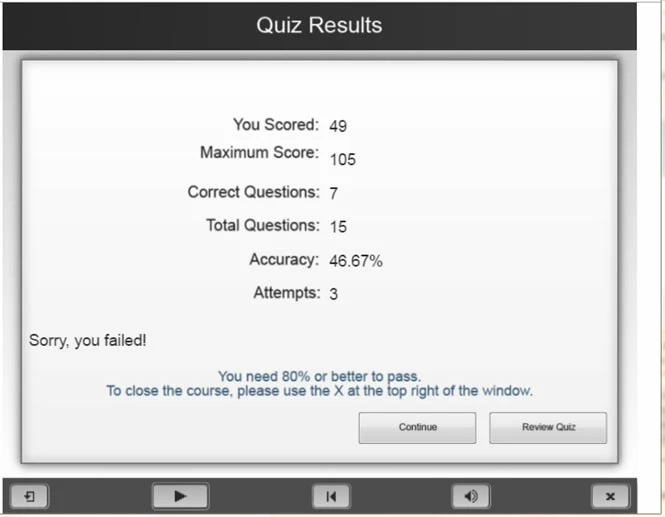
These EXACT same SCORM wrapped courses are also being used by one of my customers on their LMS (SABA). They are using the EXACT same version of Chrome I have. That version is 57.0.2987.133. The screen shots immediately below are from my customer and from me on the exact same course. One of their employees took one of my 15 question courses and got locked out after 1 try on the quiz. I made it through the 3 tries before I got locked out. Yes, I have reviewed my courses several times now and I have them set up all exactly the same way (as described above).

Customer Failed Message -
My Failed Message (same course) -
I am an LMS administrator at my company. I have the ability to make changes to the Captivate, SCORM-wrap and upload to the LMS.

Any ideas?

Thank you in advance for your help,

Elle

    This topic has been closed for replies.

    2 replies

    RodWard
    Community Expert
    Community Expert
    April 18, 2017

    Did all users that were locked out after only one attempt at the quiz remain in the same session, or had they logged out and then returned to the module at a later date?  (I'm wondering if there was any LMS bookmarking in play here.)

    Have you tested these same SCORMs on SCORM Cloud to see if there is a difference in the behaviour on the same browser?

    Elle_CT
    Elle_CTAuthor
    Participant
    April 18, 2017

    Good Morning, Rod,

    Thank you for your response. These employees are in the same session. They had not yet logged out. The completed the quiz and at the end of the quiz, they get the Quiz Status screen. The screen states Attempt: 1 - You failed. And there is no Retake Quiz button.

    I have not been able to recreate this same scenario here on my LMS. I get the You Failed Attempt: 3 (because I set the quiz to 3 tries). Only at that point the Retake Quiz does not appear.

    Regarding the Cloud, I have no access to the SCORM Cloud.

    Does this help?

    Elle

    RodWard
    Community Expert
    Community Expert
    April 19, 2017

    You can start a free SCORM Cloud account for testing purposes very easily.  It's an essential tool for checking whether issues like this are due to the LMS or not.  SCORM Cloud always behaves properly.  If the course works perfectly on SCORM Cloud then the issue is almost certainly with the other LMS, not your Captivate content.

    At this point I really have no idea why identical SCORMs would behave differently in terms of whether or not they show the Retake Quiz button after only one attempt.  I've never seen that particular issue before.  The Retake Quiz button normally ONLY disappears if the quiz is successfully passed or all attempts are used up.

    You say you are absolutely CERTAIN that both LMSs are using the same SCORM package, not two different published versions of the same CPTX?

    Elle_CT
    Elle_CTAuthor
    Participant
    April 18, 2017

    Additional info - I have multiple employees at my customer who are taking one of the five courses specifically. If they fail on the first attempt, the screen noted above for "customer" appears showing Attempt: 1 and the Retake Quiz button is missing. I am not a coder and I have no idea what's causing this in the background. Flip side, I have several employees (both at the customer and my company) who have taken the same version of this elearning course, failed the first attempt and the Retake Quiz button did appear. Your thoughts?