February 17, 2015
Answered

Captivate 8 - How do i pick my own colour gradient?

  • February 17, 2015
  • 1 reply
  • 799 views

Hi. I am trying to customize the gradient colour for Fill. I do not want to use the preset colours. How can I change it?

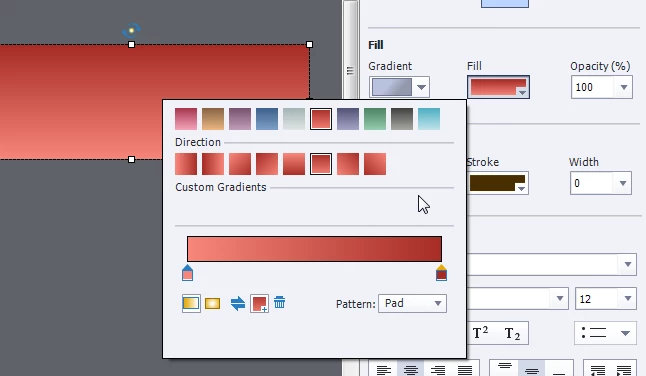
I do not see the option of picking my own colour from the colour palette anywhere. Could someone help me with this problem? Is it a setting problem for Captivate 8? How do I fix this? Please refer to the screenshot below.

Many thanks!
This topic has been closed for replies.
Correct answer Captiv8r

Hi there

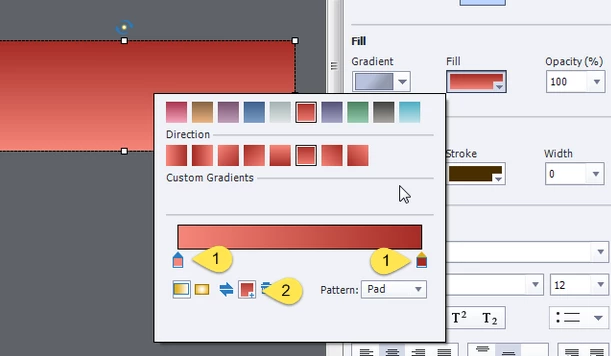
Don't you first click one of the selectors (1) then choose the color (2)?

Cheers... Rick

1 reply

Captiv8r
Captiv8rCorrect answer
Legend
February 17, 2015

Hi there

Don't you first click one of the selectors (1) then choose the color (2)?

Cheers... Rick

February 17, 2015

Ah! I see. I was dragging it around, but never tried clicking on it. Thanks for your help!

Lilybiri
Legend
February 17, 2015

You can also add 'colors stops', which are those selectors indicated by 1 in Rick's screenshot, just click somewhere on the gradient bar. You can move those color stops, and drag them down to remove them. It is the same work flow as in Photoshop and Illustrator (maybe you can find a tutorial for them). As for the colors themselves, maybe these posts will clarify the dialog box Color:

Colorful 2015 with Adobe Captivate - Captivate blog

Theme Colors - Captivate blog