
Whispering_genius0D44
Known Participant
September 9, 2015
Answered

Captivate 8 images for use in responsive learning

  • September 9, 2015
  • 1 reply
  • 293 views

Hello!

I'm new to Captivate 8, but have been using Captivate 6-7 for three years.  I'm attempting to create a responsive course, and I am inserting a logo as a PNG image.  I want this image to be in the right-hand corner for all devices.  However, i cannot get it to stay in the same place for all three.  I've tried following the directions from the AdobeELearning video by Dr. Pooja, but my image still is not staying in the same place on all devices.  Can anyone tell me what my object position properties should be? 
This topic has been closed for replies.
Correct answer Lilybiri

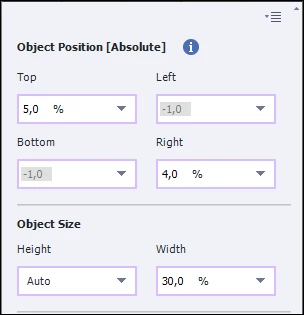
Try these settings:

The width is the most important dimension, that is why I choose a % for the width. Leave the height at Auto, which means that the width/height ratio will be maintained.

Since you are positioning to top and right borders, you don't use Relative but %.

1 reply

Lilybiri
Legend
September 9, 2015

Do you want it it keep the same size or not? Can you post the Position settings you are using at this moment?

Whispering_genius0D44
Known Participant
September 9, 2015

I want it to be the size that fits best for that device.  So, i think my answer is no.  I don't want it to necessarily be the same size on all three....just the same position.  Please forgive me if I'm being confusing, as this responsive learning is new to me.  Here are my settings currently, but keep in mind I've been messing around with them so they could be completely out of whack.  I'm also noticing the same problem with my text captions.  Thanks for your help!

Lilybiri
LilybiriCorrect answer
Legend
September 9, 2015

Try these settings:

The width is the most important dimension, that is why I choose a % for the width. Leave the height at Auto, which means that the width/height ratio will be maintained.

Since you are positioning to top and right borders, you don't use Relative but %.