
Captivate 8 - Quiz retake creates rollover shadowing
I need to know how to fix this, or if this is another Captivate issue that remains unresolved for version 8:
I have created many quizzes utilizing Captivate 8. With all of them - whenever an attempt to retake a quiz occurs, the answers (when rolled over) have a darkened shadow on them, and, in some cases, an overlay shadow.
From what I can tell - it's only happening during the attempt to retake the quiz, and it appears to be the text box itself is doubling up. Does that make sense? In some cases it overlays and you can see the difference clearly. This is about the text boxes containing the answer text - not the Default Answer Area itself - but the individual text boxes within that area. They are double loading and creating a darker shadow. And they aren't loading properly because sometimes the answer is twice the width of the overlayed text box.
Here's an example of what's happening:
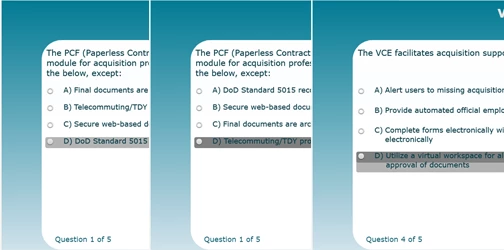
The left side is the first attempt at the quiz. The middle is the second attempt - the Quiz Retake. The right side is the overlay.
Is there a way to stop this from happening or do I have to live with it? I suspect it has something to do with rollOvers and retaking the quiz. I have not found a way to remove the rollOvers.
 AdChoices