
Captivate 8 Software Demo recording doesn't record keyboard
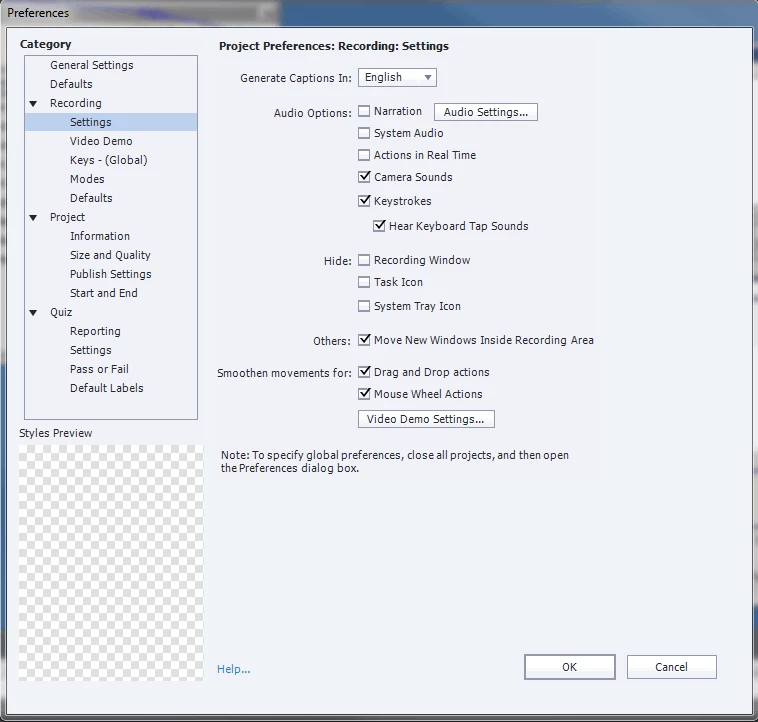
I've set my preferences this way, but every time I try to record my software demo Captivate doesn't record my keyboard and there are no tap sounds. I have already gone in to delete the the preferences folder per Rod's advice here, and saw this from Captiv8r here but it leads to a 404 page. I am at a loss. I'm recording on my primary monitor. Due to the nature of the software (floating panes within a larger environment) I am using "Application", then I select "Custom Size" (to select iPad size), then I select "Application Region" (so that I can move the recording area to the floating panes I need to record, as opposed to the entire application), and then I hit record. I am at a loss.
[edit] After discussing this internally, we've come up with a possible answer. The software I am trying to record is not local. It is hosted on a server and it is on a different OS than what's on my Laptop. Is this perhaps a reason why this won't record the keyboard? I'm not versed enough on this topic to make a definitive answer. I tried recording local software that's on my laptop and it worked! Captivate recorded the keyboard strokes on a local app using custom sizes, application region, and the entire application. After this local test, I tried to record my company's software again, and once again Captivate failed to record my keyboard...


 AdChoices