
September 25, 2016
Question

Captivate 9 cannot access assets store

  • September 25, 2016
  • 1 reply
  • 235 views

in my working place we have a proxy settings. Normally in our IE options we tick "Automatically detect settings" and IE will get pac file info from DHCP server.

However, under this settings we cannot access assets store and just got blank page.
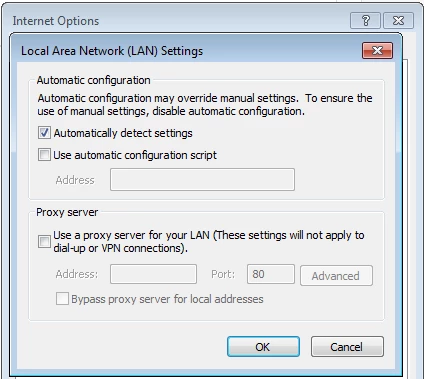
if I manually type in pac file info like blow, I can access assets store.
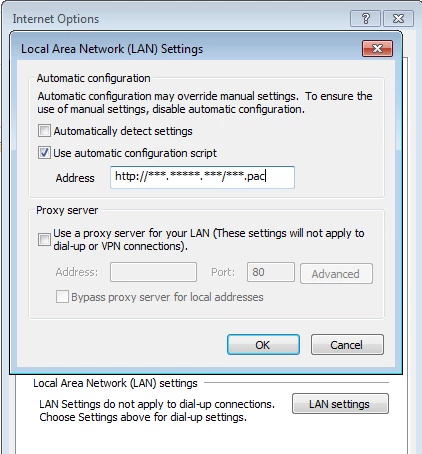
As we have over thousands of clients, it is impossible to manually change everyone's IE options settings.

Could someone help me, please?

Thank you in advance.

    This topic has been closed for replies.

    1 reply

    BDuckWorks
    Inspiring
    September 26, 2016

    As the author, creating the Captivate file, you need access to the asset store.

    Once you place those assets into Captivate and publish the file, you users don't need access to the asset store to view them.

    Just to confirm, create a small project file using the imported assets and publish. Ask one of your active clients to review the file and verify what they can see.

    September 26, 2016

    Hi,

    Thank you for your reply.

    I am not an author. I am working in an education institute as IT support. Our teachers need to access assets store.

    But due to the issue which I mentioned above, they cannot open assets page from captivate software.

    BDuckWorks
    Inspiring
    September 27, 2016

    So, how many teachers are you supporting that need access to the asset store?

    You mention that you have thousands of clients, are they all authors using Captivate on their workstation?

    If not, make the changes to the workstations of those using Captivate as you've outlined above, the users viewing the courses won't need changes to their workstation to ​complete the course materials.